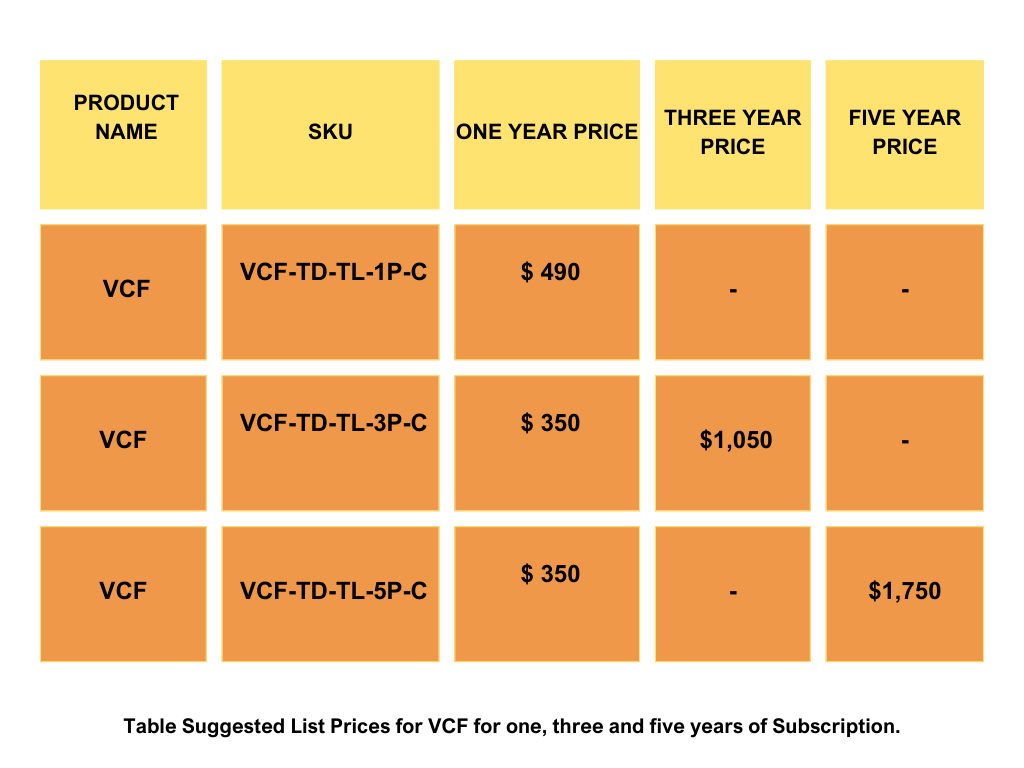
Super User

Super User

Azure VMware Solution Licensing Changes: VCF BYOL, Broadcom Deadlines, Costs, and Compliance Risks

Executive Summary

Azure VMware Solution (AVS) remains available from a technology and service-offering perspective, but Broadcom’s licensing changes are making the commercial model significantly more restrictive for customers. Previously, customers could acquire VMware Cloud Foundation (VCF) licensing directly through Microsoft as part of their AVS deployment, simplifying procurement and eliminating the need for a separate VMware/Broadcom licensing agreement.

Broadcom has now effectively closed that path as well. Microsoft is retiring the AVS SKUs that include VCF licensing, forcing customers toward portable VCF subscriptions that must be purchased separately from Broadcom or its authorized channel partners. The result is additional procurement complexity, greater dependency on Broadcom’s licensing model, and potentially less commercial flexibility for customers that previously relied on Microsoft as the single contracting vehicle for AVS.

Under the BYOL model, Microsoft continues to operate the AVS platform, while customers must purchase VCF, register their license details in Azure, and ensure deployed BYOL cores remain aligned with their Broadcom entitlements.

Two separate deadlines require immediate attention depending on the customer’s current AVS licensing model:

  • October 31, 2026 – License-Included PayGo: Customers using license-included Pay-As-You-Go (PayGo) deployments must transition to the portable VCF (BYOL) licensing model by this date.

  • August 30, 2027 – License-Included Reserved Instances: Customers with existing license-included Reserved Instances (RIs) may continue using them until their reservation expires or August 30, 2027, whichever comes first. After that, they must transition to portable VCF (BYOL) licensing or move their workloads off AVS.

What Changed & Why It Matters
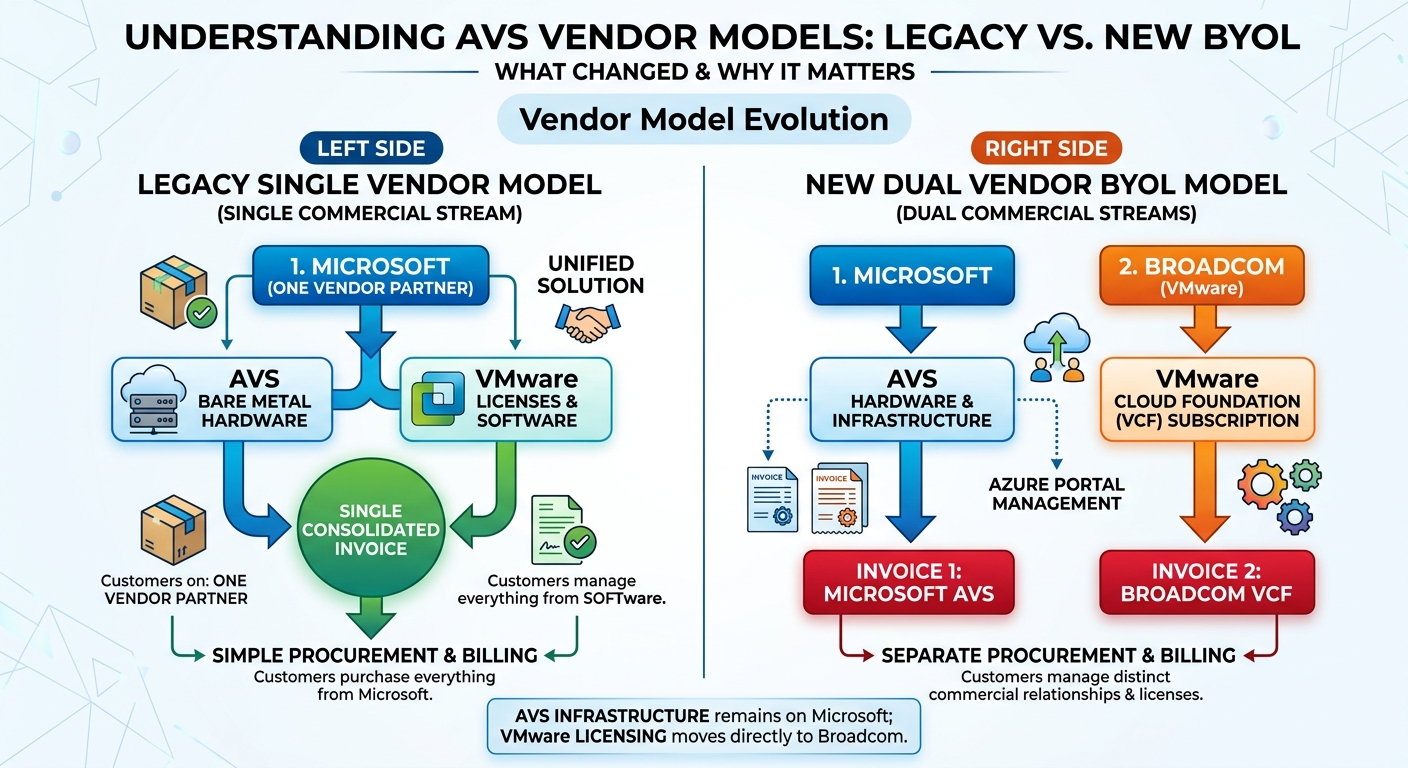
Understanding AVS vendor models: legacy single-vendor model versus the new dual-vendor BYOL model

Microsoft continues to fully manage AVS infrastructure and SDDC components (ESXi, vCenter, NSX upgrades/patches), but software licensing is now unbundled. Customers manage two separate commercial components: AVS infrastructure billed by Microsoft, and portable VCF subscriptions purchased separately from Broadcom or its channel ecosystem.

Key Transition Timeline & Cutoff Milestones
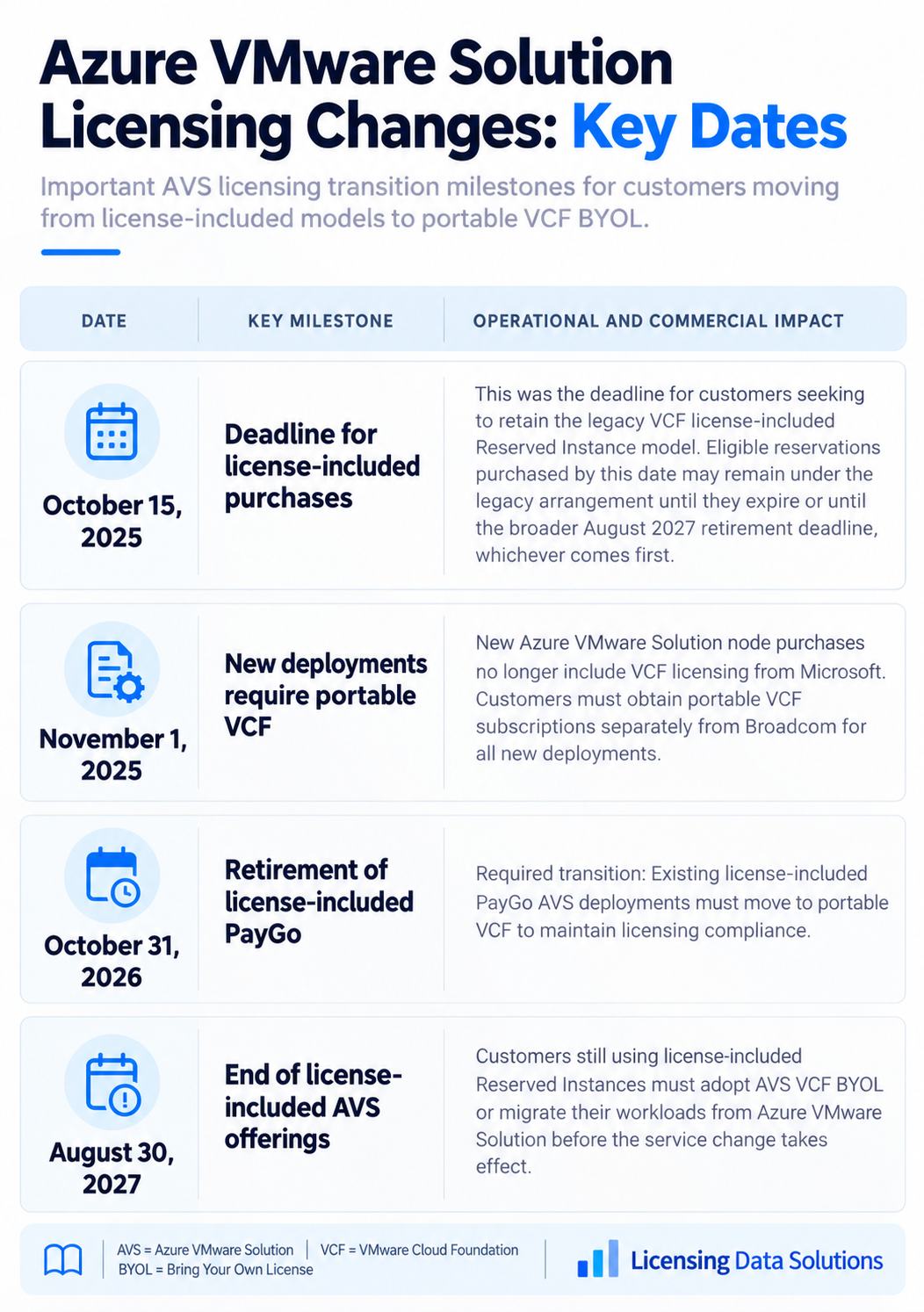
Azure VMware Solution licensing changes key dates
Date Key Milestone Operational and Commercial Impact
October 15, 2025 Deadline for license-included purchases This was the deadline for customers seeking to retain the legacy VCF license-included Reserved Instance model. Eligible reservations purchased by this date may remain under the legacy arrangement until they expire or until the broader August 2027 retirement deadline, whichever comes first.
November 1, 2025 New deployments require portable VCF New Azure VMware Solution node purchases no longer include VCF licensing from Microsoft. Customers must obtain portable VCF subscriptions separately from Broadcom for all new deployments.
October 31, 2026 Retirement of license-included PayGo Required transition Existing license-included PayGo AVS deployments must move to portable VCF to maintain licensing compliance.
August 30, 2027 End of license-included AVS offerings Customers still using license-included Reserved Instances must adopt AVS VCF BYOL or migrate their workloads from Azure VMware Solution before the service change takes effect.

https://learn.microsoft.com/en-us/azure/azure-vmware/license-included-service-retirement

Recommendations for Azure VMware Solution Customers

  • Perform a VMware/Broadcom License Position Assessment.
    Before transitioning to Broadcom-purchased VCF subscriptions, customers should establish a clear understanding of the VMware footprint currently deployed within Azure VMware Solution. Broadcom’s licensing model includes core-based licensing, minimum requirements, bundled products, and strict compliance obligations. Customers should consider engaging an independent licensing specialist such as Licensing Data Solutions to validate deployment counts, determine the appropriate VCF quantity, identify compliance exposure, and estimate the financial impact of moving from Microsoft-provided licensing to a Broadcom or channel agreement.

  • Build the transition plan well ahead of the retirement dates.
    License-included PayGo AVS deployments must transition to portable VCF by October 31, 2026, while remaining license-included Reserved Instance deployments must transition by August 30, 2027. Customers should avoid waiting until the final months, particularly because Broadcom procurement, contract negotiations, reservation exchanges, and technical registration can take time.

  • Model the full financial impact before signing with Broadcom.
    Do not evaluate only the VCF subscription price. Model total cost across VCF licenses, Azure AVS infrastructure, Reserved Instances, support, vDefend Firewall, future expansion, and any migration or modernization costs. This will help determine whether remaining on AVS is economically preferable to Azure-native alternatives or another private-cloud platform.

  • Validate VCF core requirements before every AVS expansion.
    Customers are responsible for ensuring that the number of registered portable VCF cores does not exceed their Broadcom entitlement. Azure host types carry fixed core counts—for example, AV36 has 36 cores and AV64 has 64 cores—so even a small infrastructure expansion can create a material licensing requirement.

  • Establish an ongoing compliance control.
    Treat portable VCF licensing as an actively managed entitlement, not a one-time purchase. Track VCF keys, subscription expiration dates, licensed cores, registered cores by private cloud, new host additions, and changes to firewall usage. Microsoft explicitly states that customers are responsible for keeping AVS registrations aligned with their Broadcom entitlements.

  • Review vDefend Firewall separately.
    Customers using NSX Distributed Firewall or Gateway Firewall functionality should confirm whether additional vDefend licensing is required. Microsoft notes that firewall usage above grandfathered entitlements can require a separate Broadcom vDefend subscription, and an improperly licensed private cloud can become noncompliant.

  • Maintain licensing headroom, but avoid unnecessary overbuying.
    Customers should maintain enough VCF capacity to support planned AVS growth, but should not purchase excessive cores simply to create a large compliance buffer. Forecast likely host additions and negotiate expansion pricing in advance.

  • Negotiate Strong Commercial Protections in the Broadcom Agreement.
    Customers should avoid accepting Broadcom’s standard commercial terms without negotiating protections that reduce long-term cost and licensing risk. Key provisions should include:

    • 3%–5% Renewal Price Caps: Establish a contractual annual cap on renewal increases.

    • Fixed Expansion Pricing: Pre-negotiate per-core pricing for incremental capacity.

    • Aligned Contract Terms: Coordinate Broadcom subscription dates with Azure Reserved Instance exchange and renewal dates.

    • License Portability Rights: Preserve the ability to move portable VCF licenses between qualifying on-premises and supported cloud environments.

    • True-Down Rights: Seek the ability to reduce committed quantities as workloads migrate away from VMware.

    • Audit Protections: Negotiate reasonable audit notice periods, defined audit scope, confidentiality requirements, cure periods, and restrictions on repeated or overly broad audits.

    • Price Protection for Future Growth: Lock in discount levels or unit pricing for anticipated VCF expansion during the agreement term.

    • Termination and Migration Rights: Where possible, negotiate flexibility if the customer exits AVS or materially reduces its VMware footprint.

  • Evaluate an AVS exit or modernization strategy in parallel.
    Customers should not automatically assume that purchasing Broadcom VCF and remaining on AVS is the best long-term answer. Microsoft itself points customers toward alternatives including Azure-native infrastructure, Azure Red Hat OpenShift, and Nutanix Cloud Clusters on Azure. Customers should compare the multi-year cost and operational impact of staying on VMware with a phased migration away from VMware dependency.

  • Use the licensing transition as negotiation leverage.
    Customers being forced from Microsoft-included VMware licensing into a direct Broadcom commercial relationship should treat this as a new procurement event rather than simply accepting a replacement subscription. Competition, workload portability, cloud modernization, and potential VMware exit plans can all be used as leverage when negotiating price and contractual protections with Broadcom.

Final Takeaway

The shift to portable VCF licensing changes AVS from a relatively straightforward Microsoft-managed commercial model into a more complex two-party licensing structure involving both Microsoft and Broadcom. For SAM, procurement, and IT leaders, this is not simply a licensing administration change—it has direct implications for cost, compliance, contract risk, infrastructure planning, and long-term cloud strategy.

Customers should use the transition window to understand their current VMware footprint, validate the exact VCF core requirement, model the full financial impact, negotiate stronger contractual protections, and determine whether remaining on AVS is still the right long-term strategy.

The biggest risk is waiting until a renewal, expansion, or retirement deadline forces a decision. By then, customers may have significantly less negotiating leverage.

Need Help Navigating the AVS and Broadcom Transition?

Licensing Data Solutions helps organizations independently assess their VMware and Broadcom licensing position, calculate VCF requirements, identify compliance and over-licensing risk, model future costs, and prepare for negotiations with Broadcom and its channel partners.

If your organization is running Azure VMware Solution and needs to determine how many VCF licenses you actually need, what the transition is likely to cost, and what protections should be negotiated before signing a Broadcom agreement, we can help.

Contact Mark Thaver, Licensing Data Solutions at This email address is being protected from spambots. You need JavaScript enabled to view it. to discuss an independent AVS and VMware/Broadcom licensing assessment.

Know your position before Broadcom defines it for you.
Microsoft 365 Licensing

Microsoft 365 July 2026 Price Increases: What Changed, What It Will Cost, and How to Reduce Your Renewal Spend

The commercial pricing changes that Microsoft introduced on July 1, 2026 are now in force, and they include a number of price hikes, new bundled features, and some important points to take into account when renewing Microsoft 365 subscriptions.

The price rises vary from about 5 per cent to 43 per cent depending on the plan, and it is the Microsoft 365 F3 and E3 plans that experience the biggest increases. Microsoft has also included new security features, Intune, Copilot Chat, and storage options in some of the suites.

For customers who already have subscriptions or are covered by an Enterprise Agreement, the financial effect won't be felt right away but will occur at the next renewal. Because of this, the months before the renewal date are especially important, particularly since Microsoft has dropped the automatic volume-based discounts. Businesses should therefore examine their present license mix, get rid of any licenses that are not being used, adjust the number of users to match their actual needs, and decide if the new Microsoft capabilities bundled together can take the place of the separate products, add-ons or third-party tools which they are currently paying for.

The aim should not just be to accept Microsoft’s price rise; with proper preparation, customers could perhaps offset part—maybe even all—of the extra cost by means of license optimization, product consolidation, and better renewal negotiations.

Key Points:

● Frontline price rises: The frontline plans experience the largest percentage increases, with Microsoft 365 F1 going up by 33% when Teams is included and by 43% when Teams is not included, and F3 increasing by 25% when Teams is included and by 29% when Teams is not included.

● The prices for the Core Enterprise Suite are also rising: Office 365 E3 is now $26 per user per month, Microsoft 365 E3 has been set at $39, and Microsoft 365 E5 at $60 according to the published U.S. commercial list pricing.

● Added value and capabilities: Microsoft is providing new features to certain suites, such as Defender for Office 365 Plan 1, the Intune capabilities, the Copilot Chat improvements, and the Security Copilot capacity for eligible Microsoft 365 E5/E7 customers.

● When it comes to renewal and agreement timing, current customers typically switch to the new pricing at their following renewal. The mid-term pricing will vary according to the type of agreement, the subscription term, and whether the customer is adding more of a price-protected SKU or purchasing a new SKU.

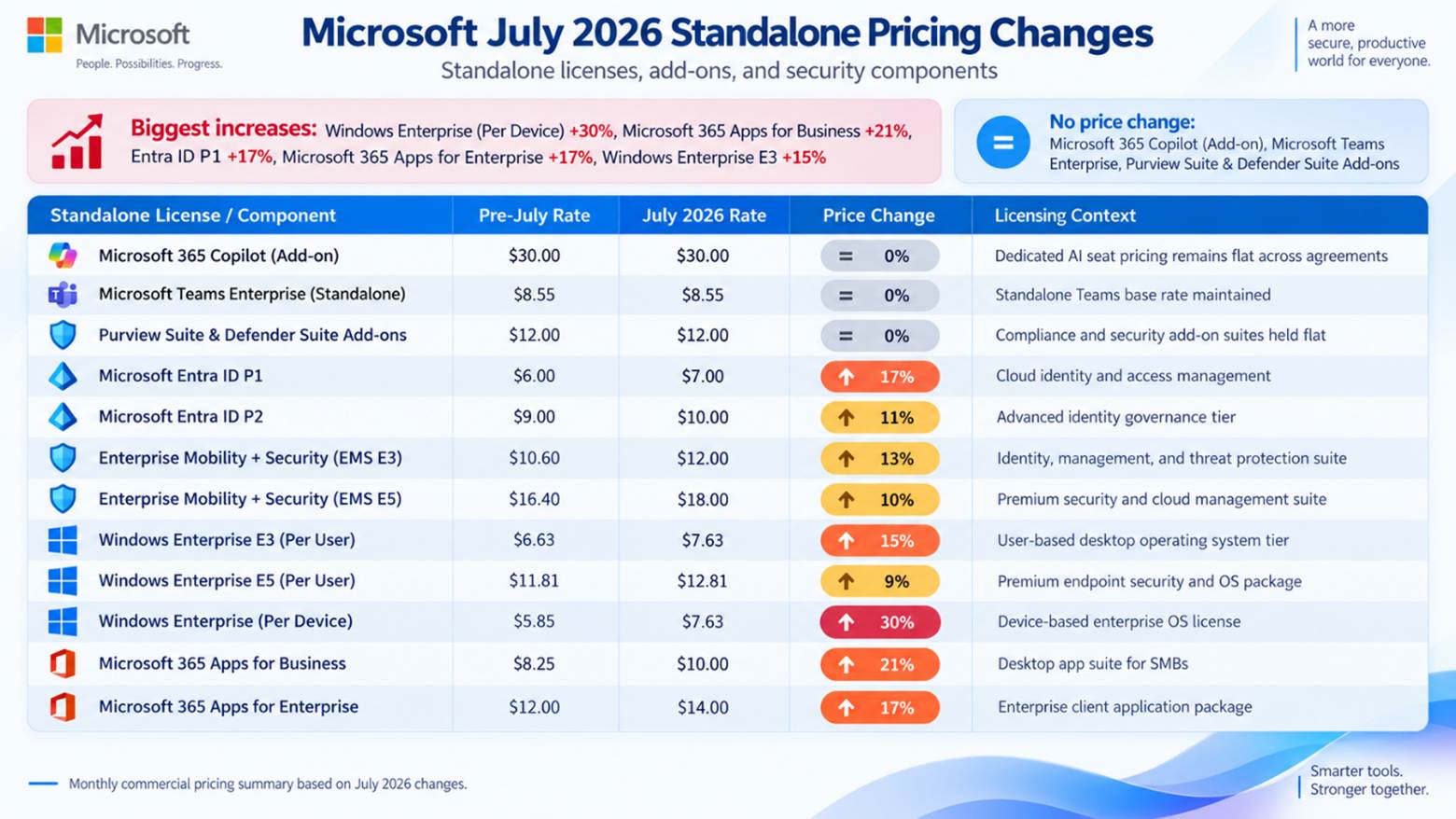
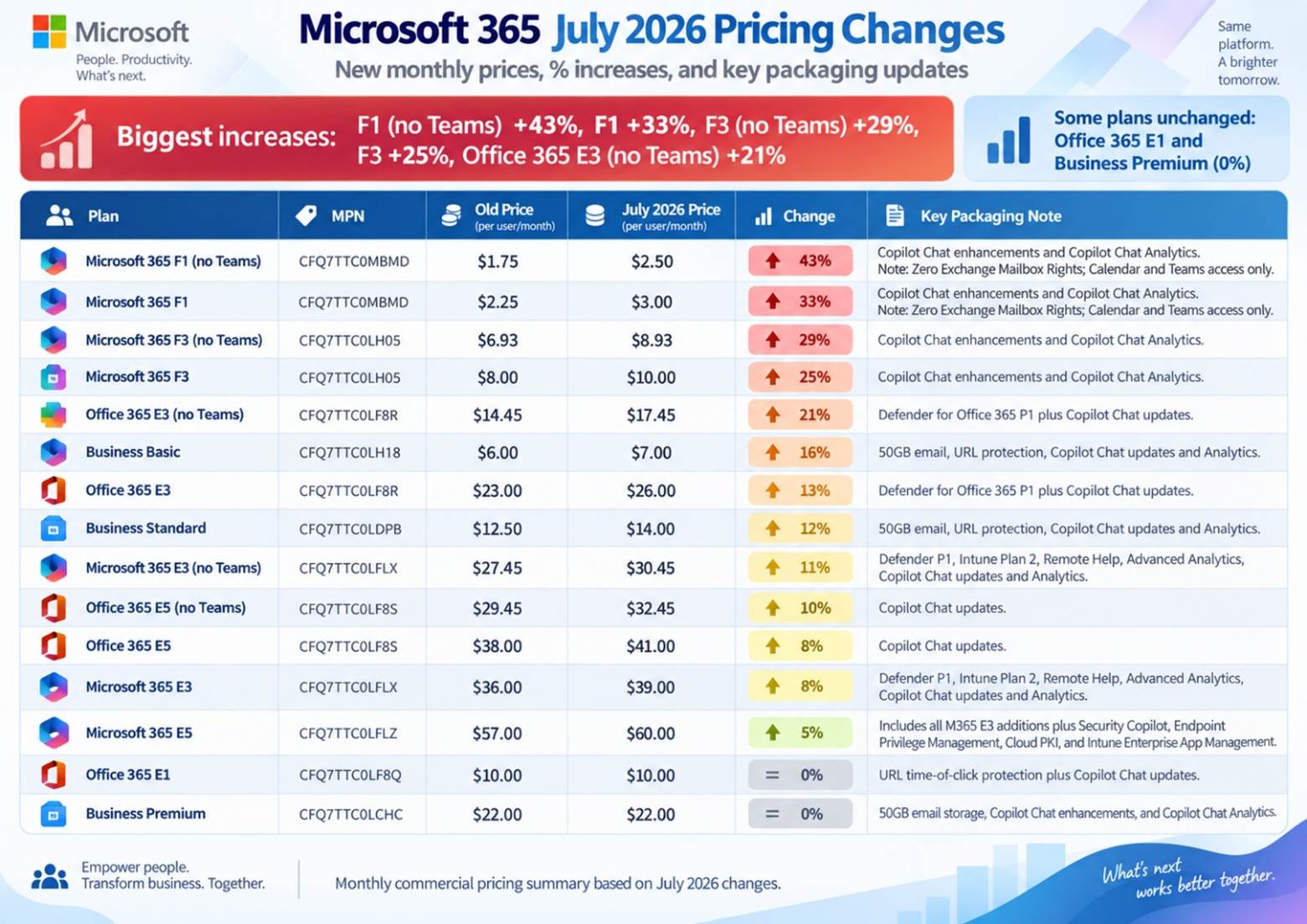
The core updates are shown in the table below for the July 2026 update, which applies to certain Microsoft 365, Office 365, Frontline, Business, and standalone products, including the published U.S. commercial list prices, the percentage changes, and the key packaging additions.

Microsoft 365 Commercial Price Increase Table

Microsoft 365 commercial price increase overview

Plan Plan Type Part Number Old Price July 2026 Price Change Key Packaging Note
Office 365 E1 Suite CFQ7TTC0LF8Q $10.00 $10.00 0% URL time-of-click protection + Copilot Chat updates
Office 365 E3 Suite CFQ7TTC0LF8R $23.00 $26.00 +13% Defender for Office 365 P1 + Copilot Chat updates
Office 365 E3 (no Teams) No Teams CFQ7TTC0LF8R $14.45 $17.45 +20.8% Defender for Office 365 P1 + Copilot Chat updates
Office 365 E5 Suite CFQ7TTC0LF8S $38.00 $41.00 +8% Copilot Chat updates
Office 365 E5 (no Teams) No Teams CFQ7TTC0LF8S $29.45 $32.45 +10% Copilot Chat updates

The Business Basic, Business Standard, and Business Premium plans within Microsoft 365 Business are restricted to a maximum of 300 seats per tenant in the basic plans. Any organization which has more than 300 users must transfer its excess seats to Enterprise plans, for example Office 365 E3/E5 or Microsoft 365 E5/E3.

Frontline and No-Teams Enterprise Suites See Notable Price Increases

● The cost of Microsoft 365 F1 with Teams has increased from $2.25 to $3.00 per user per month (an increase of 33%).

● The cost of Microsoft 365 F1 without Teams rises from $1.75 to $2.50 per user per month (an increase of 43%).

● The price of Microsoft 365 F3 with Teams rises from $8.00 to $10.00 per user per month (an increase of 25%).

● The cost of Microsoft 365 F3 without Teams rises from $6.93 to $8.93 per user per month (an increase of 29%).

● The cost of Office 365 E3 without Teams goes up from $14.45 to $17.45 per user per month (an increase of 20.8%).

● The cost of Office 365 E5 without Teams goes from $29.45 to $32.45 per user per month (an increase of 10%).

● The price of Microsoft 365 E3 without Teams goes from $27.45 to $30.45 per user per month (an increase of 10.9%).

Technical Limits and Mailbox Rights:

● Microsoft 365 F1 does not feature Exchange mailbox rights, so F1 users cannot have a mailbox assigned to them and any attempt to create one might fail or result in compliance problems. F1 provides access to Teams via the web and mobile versions as well as only the Calendar features.

● Microsoft 365 F3: has a 2 GB limit on the Exchange mailbox and only supports Outlook on the web and mobile; in contrast, the Enterprise plans, such as E3 and E5, provide full 100 GB mailboxes.

The rules regarding licensing eligibility provide that, in accordance with the Microsoft Product Terms, Frontline F1/F3 licenses can only be allocated to employees who satisfy the required device rules, such as having a primary device with a screen size of 10.9 inches or less, or who use dedicated shared devices during different shifts.

Standalone Applications & Add-on Price Adjustments

In addition to integrated suites, several standalone licensing components experienced rate adjustments during this commercial pricing cycle:

Microsoft July 2026 standalone pricing changes overview

Standalone License / Component Pre-July Rate July 2026 Rate Price Change Licensing Context
Microsoft 365 Copilot (Add-on) $30.00 $30.00 0% Dedicated AI seat pricing remains flat across agreements
Microsoft Teams Enterprise (Standalone) $8.55 $8.55 0% Standalone Teams base rate maintained
Purview Suite & Defender Suite Add-ons $12.00 $12.00 0% Compliance and security add-on suites held flat
Microsoft Entra ID P1 $6.00 $7.00 +16.7% Cloud identity and access management
Microsoft Entra ID P2 $9.00 $10.00 +11.1% Advanced identity governance tier
Enterprise Mobility + Security (EMS E3) $10.60 $12.00 +13.2% Identity, management, and threat protection suite
Enterprise Mobility + Security (EMS E5) $16.40 $18.00 +9.8% Premium security and cloud management suite
Windows Enterprise E3 (Per User) $6.63 $7.63 +15.1% User-based desktop operating system tier
Windows Enterprise E5 (Per User) $11.81 $12.81 +8.5% Premium endpoint security and OS package
Windows Enterprise (Per Device) $5.85 $7.63 +30.4% Device-based enterprise OS license
Microsoft 365 Apps for Business $8.25 $10.00 +21.2% Desktop app suite for SMBs
Microsoft 365 Apps for Enterprise $12.00 $14.00 +16.7% Enterprise client application package

Enterprise Agreement (EA) & CSP Renewal Guidance

Customers of an Enterprise Agreement (EA) will retain their locked-in prices for the entire duration of the active multi-year term. If the EA expires after July 1, 2026, the products that are enrolled will be subject to the revised rates at the time of renewal, and any new discounts will have to be negotiated.

Critical comparison between EA and CSP regarding mid-term additions and price protection.

Price protection and mid-term purchasing rules operate differently across Enterprise Agreement and Cloud Solution Provider models:

● For customers who have Enterprise Agreements (EA), price protection for the products they have enrolled is maintained throughout the multi-year term via the Customer Price Sheet (CPS): any additional seats for SKUs that are already listed on the CPS will be charged at the contracted rate, whereas new SKUs added during the term will be priced at the list rate that was in effect at the time they were ordered.

● For Cloud Solution Provider (CSP) subscriptions: instead of using an EA Customer Price Sheet, price protection is linked to the term of the active subscription, for example 12 or 36 months. The rates stay fixed during that term and are then changed to the new prices at the following scheduled renewal.

Strategic License Optimization & Cost Reduction Framework

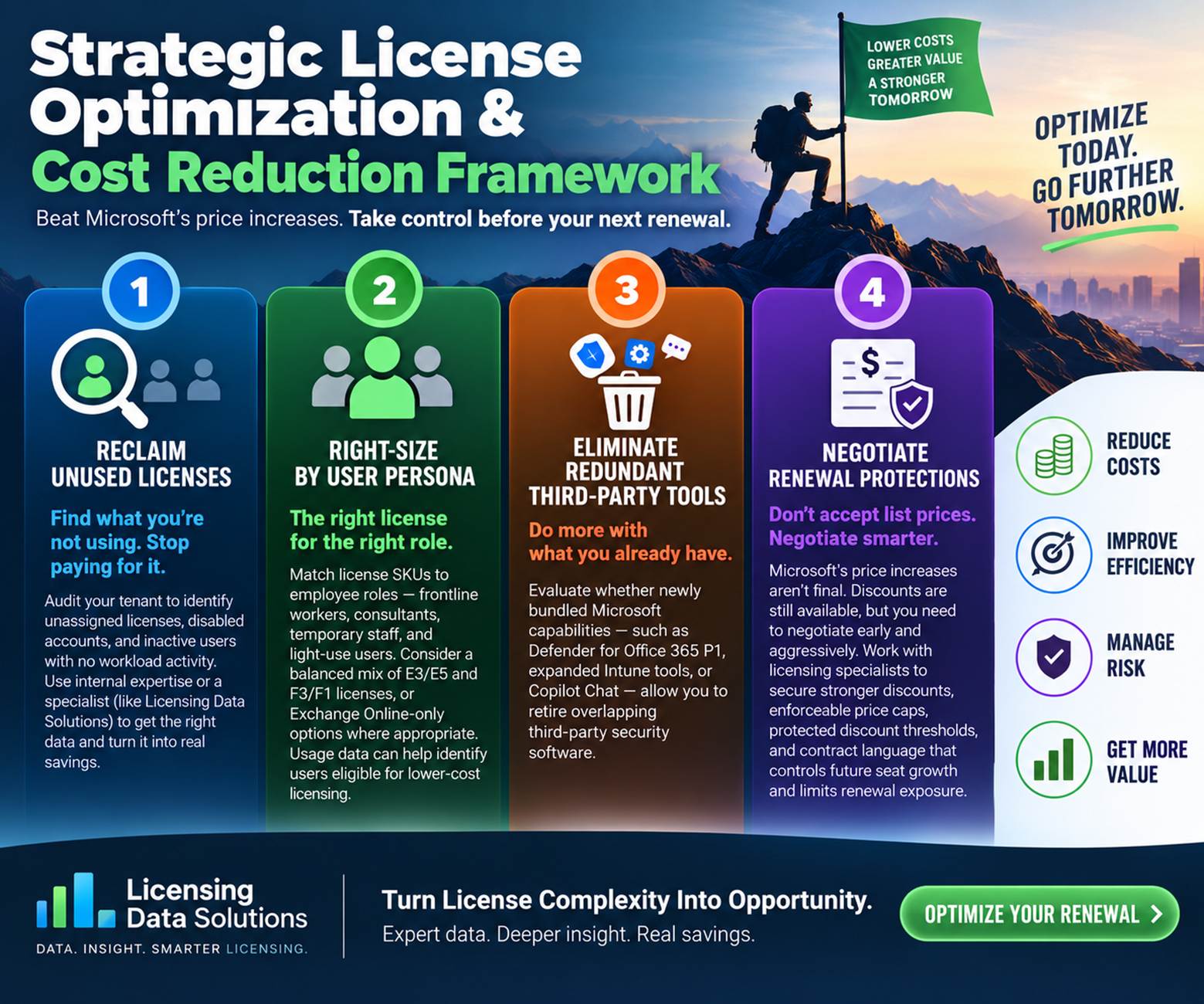
Strategic license optimization and cost reduction framework

To mitigate the financial impact of Microsoft’s commercial price increases, CIO’s, Software Asset Managers (SAMs), and procurement leads should execute these five core optimization steps before committing to their next renewal:

1. Recover licenses that are not being used: As the total cost is determined by the SKU price times the quantity, organizations can lessen the effect on their budget by examining demand, consumption, and the suitability of the licenses. Carry out a comprehensive audit across all tenants to spot unused licenses, disabled accounts, and inactive users who have no workload activity. If the organization lacks in-house expertise in licensing, it might be worthwhile to hire a specialist such as Licensing Data Solutions to gather the correct deployment data, interpret the complicated licensing rules, and find actionable opportunities for reclaiming licenses.

2. Tailor the licenses to the different types of users: match the license SKUs to employee roles by setting up separate profiles for groups like frontline workers, consultants, temporary staff, and light-use users. Even though IT teams might prefer to assign E3 or E5 licenses to everyone, the increasing costs make it more difficult to justify adopting a one-size-fits-all strategy. Many companies are able to cut back on their spending by using a combination of E3/E5 and F3/F1 licenses, or by choosing Exchange Online-only options where suitable. Licensing Data Solutions can examine usage data in order to spot user groups that may qualify for more affordable licensing.

3. Check whether the new features that have been bundled can result in dropping of other third party software—such as Defender for Office 365 P1, the enhanced Intune management tools, or Copilot Chat—mean that your business can get rid of its existing third-party security software that overlaps with these capabilities.

4. Negotiate the renewal protections: it should not be assumed that the price increases published by Microsoft are final. Although discounts are still available for these SKUs, it is necessary to negotiate vigorously and as early as possible. Collaborate with licensing specialists in order to obtain stronger discounts, enforceable price caps, protected discount thresholds, and contractual terms which control future seat growth and reduce renewal exposure.

How Licensing Data Solutions (LDS) Can Help

Licensing Data Solutions (LDS) helps enterprise procurement and IT leaders navigate Microsoft renewals through independent market benchmarking, workload analysis, and commercial strategy:

● Office 365 License Optimization Report: This detailed report provides a clear and audit-ready overview of your Office 365 environment by highlighting active, unassigned, duplicate, dormant, and stale licenses. It reveals practical ways to adjust user allocations, recover unused seats, and cut down on unnecessary licensing expenses prior to your next Microsoft renewal. Organizations generally manage to reduce their Office 365 licensing costs by 15% to 20% as a result of this type of analysis. If you would like to arrange your review, please contact Mark Thaver at This email address is being protected from spambots. You need JavaScript enabled to view it..

● Persona and usage optimization: regain seats that have been inactive and ensure that the licenses are properly sized in accordance with the policy for the M365 E3, E5, F3, and Business plans.

Conclusion: Taking Control of Your Next Microsoft Renewal

Since the commercial price changes introduced by Microsoft in July 2026 are now in force, businesses should turn their focus to the next renewal point. Although those organizations that have large Frontline deployments might experience the highest percentage increases, each customer should check their actual workload usage before agreeing to the higher baseline prices.

It is not necessary for higher published list prices to mean that the budget should also increase. Procurement teams can keep costs under control and obtain better renewal protections before their contract date by reclaiming inactive seats, enforcing the Frontline eligibility rules, assessing the value of the bundled security features, and separately benchmarking the commercial terms.

Salesforce licensing update

Salesforce Core, Advanced & Max: What the New Editions Mean for Pricing, Flex Credits, and Your Next Renewal

Salesforce has replaced its Enterprise, Unlimited, and Agentforce 1 editions with three consolidated tiers. Here is what changed, what the bundles include, and how customers can prepare before renewal.

Effective September 3, 20268-minute readLicensing Data Solutions

On September 3, 2026, Salesforce introduced the Core, Advanced, and Max editions for Sales Cloud and Service Cloud, replacing the Enterprise, Unlimited, and Agentforce 1 editions. Current U.S. list prices are $195 for Core, $395 for Advanced, and $550 for Max per user per month, billed annually. Pricing for the new Industry editions will take effect later in fall 2026.

Existing Salesforce contracts and SELAs remain unchanged until customers renew or make additional purchases. This article summarizes the packaging updates, details what each bundle includes, and recommends steps customers can take to prepare.

Core$195
per user / month
Advanced$395
per user / month
Max$550
per user / month

What’s included in the new bundles?

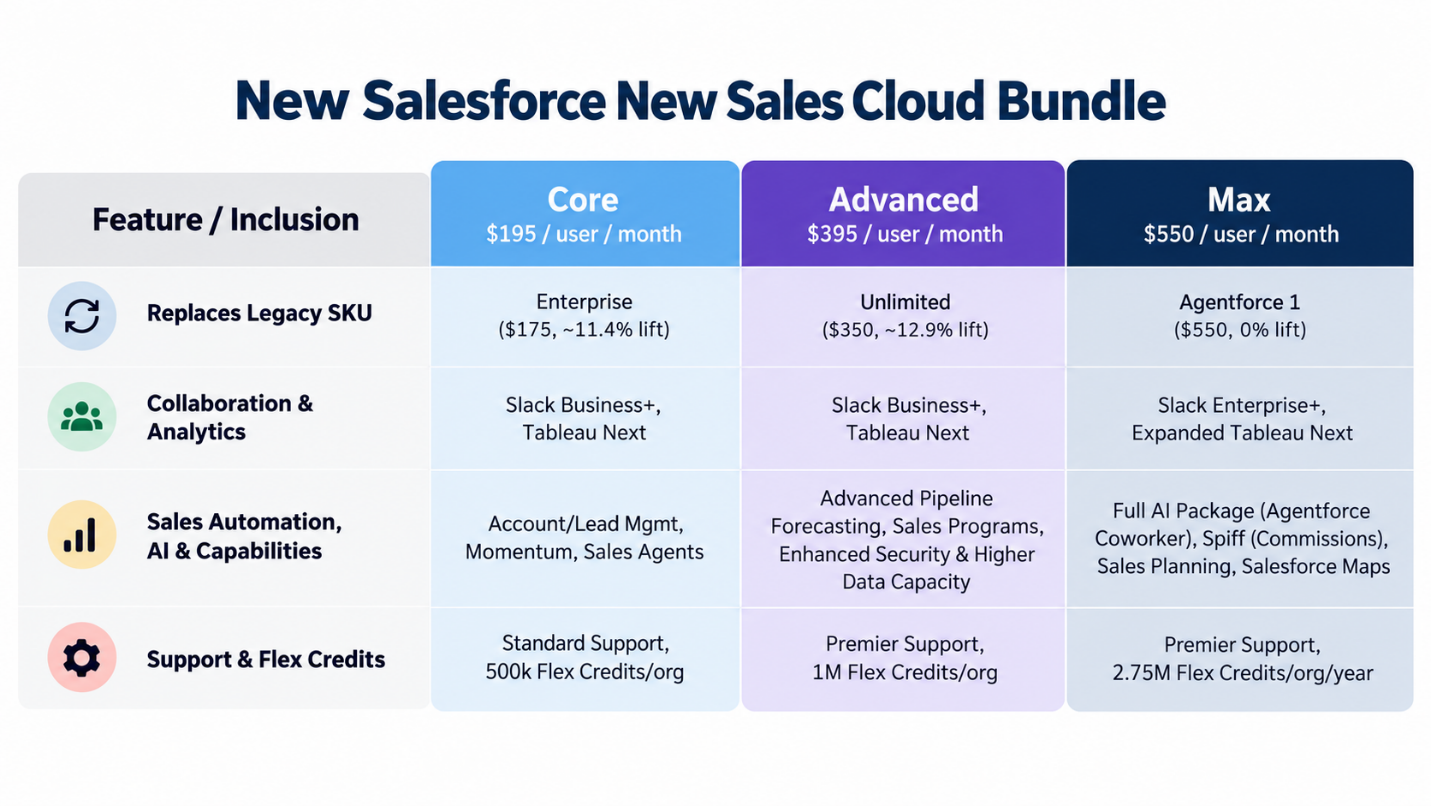
Sales Cloud edition matrix

Comparison of Salesforce Sales Cloud Core, Advanced, and Max editions, including legacy SKUs, collaboration, analytics, sales automation, support, and Flex Credits
Sales Cloud: Core, Advanced, and Max feature comparison. Prices shown are current U.S. list prices, billed annually.
View an accessible text version of the Sales Cloud matrix
Feature / inclusion Core — $195/user/month Advanced — $395/user/month Max — $550/user/month
Replaces legacy SKU Enterprise ($175, ~11.4% lift) Unlimited ($350, ~12.9% lift) Agentforce 1 ($550, 0% lift)
Collaboration & analytics Slack Business+; Tableau Next Slack Business+; Tableau Next Slack Enterprise+; expanded Tableau Next
Sales automation, AI & capabilities Account/lead management; Momentum; Sales Agents Advanced pipeline forecasting; Sales Programs; enhanced security and higher data capacity Full AI package (Agentforce Coworker); Spiff; Sales Planning; Salesforce Maps
Support & Flex Credits Standard Support; 500,000 Flex Credits/org Premier Support; 1 million Flex Credits/org Premier Support; 2.75 million Flex Credits/org/year

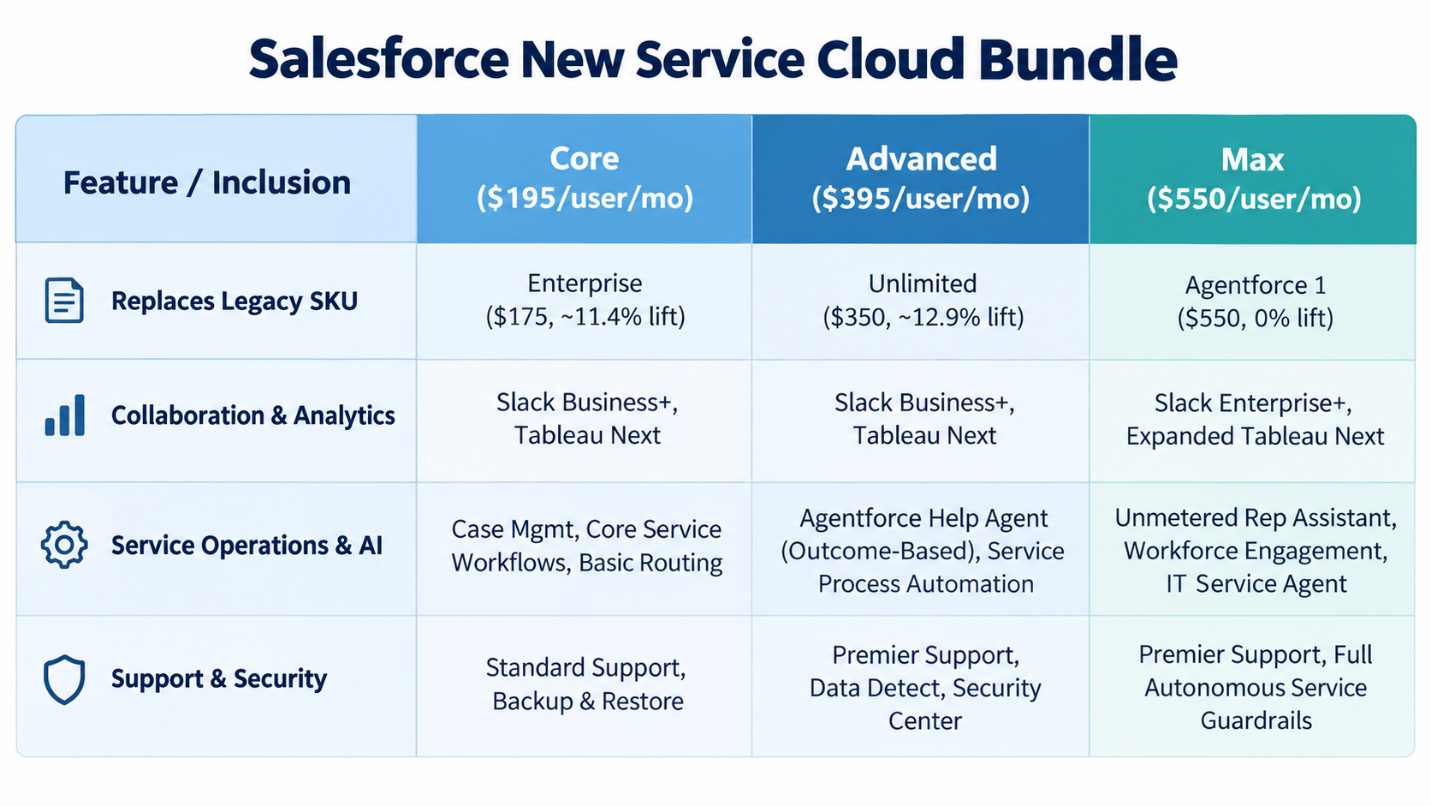
Service Cloud edition matrix

Comparison of Salesforce Service Cloud Core, Advanced, and Max editions, including legacy SKUs, analytics, service operations, AI, support, and security
Service Cloud: Core, Advanced, and Max feature comparison.
View an accessible text version of the Service Cloud matrix
Feature / inclusion Core — $195/user/month Advanced — $395/user/month Max — $550/user/month
Replaces legacy SKU Enterprise ($175, ~11.4% lift) Unlimited ($350, ~12.9% lift) Agentforce 1 ($550, 0% lift)
Collaboration & analytics Slack Business+; Tableau Next Slack Business+; Tableau Next Slack Enterprise+; expanded Tableau Next
Service operations & AI Case management; core service workflows; basic routing Agentforce Help Agent (outcome-based); service process automation Unmetered Rep Assistant; Workforce Engagement; IT Service Agent
Support & security Standard Support; Backup & Restore Premier Support; Data Detect; Security Center Premier Support; full autonomous service guardrails

Purchasing options and renewal considerations

Salesforce customers with active contracts retain their legacy packages and existing price protections. However, the new packaging applies to additional license purchases and early renewals.

  • Agentforce 1 migration: Existing Agentforce 1 customers can upgrade to Max ($550) at no additional cost.
  • Starter and Pro Suite availability: Starter Suite ($25 per user per month) and Pro Suite ($100 per user per month) remain available on Salesforce’s public pricing pages.
  • Enterprise and Unlimited: These bundles will transition to Core and Advanced.

Salesforce value claims vs. procurement reality

Salesforce positions the consolidated tiers as higher-value packages and uses these claims to support the price increases over legacy SKUs:

  • Included in base rates: Slack, Tableau Next analytics, native security tools, Premier Success for Advanced and Max, annual organization-level Flex Credit pools, and planned Headless 360 access for Max.
  • Billed separately: Flex Credit usage above annual organization limits, custom third-party AI models, and specialized Industry Cloud data add-ons.
  • Not included: MuleSoft and Informatica are not part of the bundle.
  • Core tier: Marketed as providing 70% more value than the legacy Enterprise edition.
  • Advanced tier: Marketed as providing more than 50% greater value than the legacy Unlimited edition.
  • Max tier: Marketed as providing nearly 60% more value than the legacy Agentforce 1 edition.

Procurement takeaway: Despite Salesforce’s added-value positioning, customers should assess whether the bundled capabilities provide meaningful value for their organization.

How many Flex Credits are included?

The main operational concern with Salesforce’s new tiers is how AI capacity is measured and allocated. Although “millions of Flex Credits” may sound generous, customer teams should examine the actual usage limits, rate-card calculations, and overage rules.

The per-organization catch and real usage math

Flex Credits are allocated annually at the organization level, so purchasing additional user licenses does not increase the credit pool.

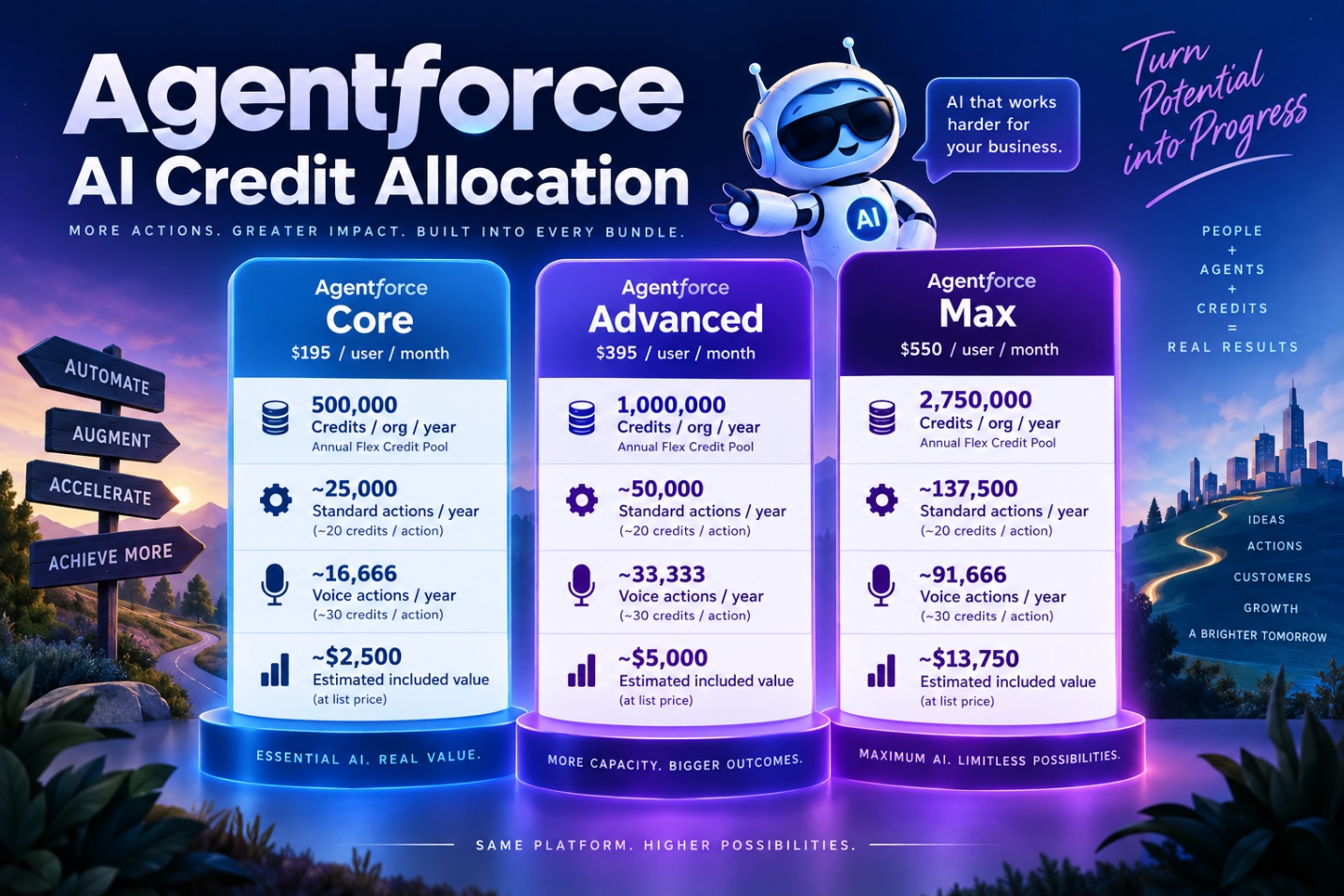
Agentforce AI credit allocation for Core, Advanced, and Max, showing annual credits, estimated standard and voice actions, and included list-price value
Annual Agentforce Flex Credit allocation and estimated actions by edition.
View an accessible text version of the Flex Credit allocation
Allocation Core Advanced Max
Credits / org / year 500,000 1,000,000 2,750,000
Standard actions / year ~25,000 at ~20 credits/action ~50,000 at ~20 credits/action ~137,500 at ~20 credits/action
Voice actions / year ~16,666 at ~30 credits/action ~33,333 at ~30 credits/action ~91,666 at ~30 credits/action
Estimated included value ~$2,500 ~$5,000 ~$13,750

Credit expiration, rollover, and transfer rules

  • Use it or lose it: Flex Credits expire at the end of each 12-month contract term. Unused credits neither roll over to the next year nor transfer between organizations.
  • Pool isolation: Credits are tied to the production instance listed on the order form. Moving them to sandboxes or unlinked organizations requires custom contract terms.
  • Credit overages: If you exhaust your AI Credits, you must purchase additional credits.

How Salesforce customers should respond

  1. Right-size Salesforce usage to limit price increases

    Before migrating tiers, procurement teams should conduct a detailed, line-item review of deployments, usage, and active entitlements across Service and Sales Cloud, Slack, Tableau, enterprise security, support plans, storage limits, and AI add-ons. The goal is to eliminate waste, right-size quantities, and enter renewal negotiations with a precise view of required licenses and AI credits.

    Before negotiations begin, SAM leaders should collect 90 days of operational telemetry:

    • User activity logs: Identify inactive or underused seats, including users who have not logged in within the past 60–90 days. Reclaim or downgrade these licenses before committing to new seat counts.
    • Feature usage analysis: Distinguish advanced workflows, pipeline forecasting, and premium analytics from basic record entry.
    • Add-on and storage inventory: Review standalone Slack, Tableau, Premier Support, file storage, and data-storage overages to establish the exact baseline cost.
    • Flex Credit usage: Model forecast AI usage and analyze historical activity to estimate whether the organization will remain within its bundled allowance or incur overage charges.

    Reviewing demand and right-sizing licenses requires specialized licensing expertise and a clear understanding of where deployment and consumption data is stored across portals, APIs, and other data sources.

  2. Compare the cost of bundled and standalone products

    Procurement teams should compare Salesforce bundle costs with the savings available from retiring duplicate third-party software:

    • Compare the added cost: Calculate the annual increase to Core, Advanced, or Max, then compare it with the savings from software you can cancel.
    • Focus on real savings: Do not rely on Salesforce’s list-price totals. Focus on money your organization will actually save by canceling duplicate licenses.
    • Check whether tools can be removed: Confirm with technical teams that third-party tools can be retired. Missing features or integrations could leave you paying for both.
  3. Review existing agreements to avoid duplicate Salesforce costs

    When moving users to Core, Advanced, or Max, review existing contracts in four areas:

    • Slack agreements: If your company already has a company-wide Slack Enterprise Agreement, ask for a credit on the main agreement or a path to Slack Enterprise+.
    • Separate Tableau contracts: If Tableau Next meets your reporting needs, reduce or cancel separate Tableau licenses before signing the new contract.
    • Separate support contracts: Advanced and Max include Premier Success Plans. Ensure an existing separate 30% Premier Support charge is removed when you migrate.
    • Unused legacy credits: Ask whether unused Agentforce, Data Cloud, or other legacy consumption credits can be converted or credited toward Flex Credits.

Key contract terms to negotiate

Before moving to Core, Advanced, or Max, customers should add clear protections to the contract. Procurement, software asset management, and IT leaders should agree on the following terms before signing an amendment or order form:

  • Cap renewal price increases at 3%–5%: Ask Salesforce to apply current price caps to the new rates.
  • Protect against product replacements: Require Salesforce to preserve features, credits, and pricing if it renames or replaces a tier during the contract.
  • Ask for credits during migration: Request credits for prepaid Slack, Tableau, or Premier Support contracts that have not expired.
  • Set Flex Credit top-up prices in advance: Agree on discounted rates for extra credit blocks purchased during the contract.
  • Allow credits to move between organizations: Negotiate the right to transfer unused credits between Salesforce organizations.
  • Protect pricing for additional licenses: Lock the negotiated per-user price and discount percentage during the term. New licenses should be prorated and co-termed.

Final thoughts: prepare before your next Salesforce renewal

Salesforce’s move to Core, Advanced, and Max represents more than a simple packaging change. Customers are being asked to evaluate higher per-user pricing alongside bundled capabilities, new AI consumption models, organization-level Flex Credit allowances, and potentially overlapping products such as Slack, Tableau, support, security, and AI services.

For procurement, SAM, IT, and finance teams, the key is to evaluate total cost of ownership rather than the headline license price. Organizations should understand which bundled features they will actually use, identify licenses and third-party products that can be reduced or eliminated, forecast Flex Credit consumption, and negotiate protections around future pricing, overages, additional licenses, and product changes.

Do not wait until renewal negotiations begin. Building an accurate licensing and consumption baseline in advance gives customers greater leverage to challenge proposed quantities, model alternatives, and negotiate from a position supported by actual usage data.

Pricing and packaging details reflect information available as of September 2026. Confirm current terms and regional pricing with Salesforce before making purchasing decisions.

Introduction

Is your Microsoft Enterprise Agreement up for renewal? If that date falls after November 1, 2025, buckle up—you need to know what’s coming. Microsoft isn’t just adjusting the fine print; they’re ripping out the very waterfall volume discounts that once kept your costs under control.

Here’s the reality: the moment your EA or MPSA renewal kicks in, your costs don’t rise gently—they spike. Microsoft’s slick PR machine is dressing it up as “pricing consistency.” Don’t buy it. It’s not consistency—it’s a cash grab. Your negotiating power shrinks, their margins soar, and your budget takes the hit. Starting November 1, 2025, expect double-digit price hikes—not because you’re consuming more, but because the baseline discounts you relied on are being erased.

This blog breaks down exactly what’s changing, how EA and MPSA customers are being squeezed, and—most importantly—what you can do now to push back before Microsoft locks you into an expensive new reality.

What exactly is changing in November 2025?

Beginning 1st November 2025, Microsoft will eliminate volume-based “waterfall” discounts (Levels A–D) for Online Services sold under the Enterprise Agreement (EA) and the Microsoft Products and Services Agreement (MPSA).

  • All customers will now start at a standardized Online Services price (no matter the size of the organization).
  • With the new policy, these discount tiers disappear, (Levels A–D) and every customer pays the Level A price.
What are “pricing waterfalls” and how did they work before November 2025?

Historically, Microsoft’s Enterprise Agreement (EA) is divided into four volume tiers (Levels A–D). The more users you have, the bigger the built-in base discount off list prices. Here’s how it worked:

If your organization grew in size, your costs per seat actually went down. A company with 20,000 users/seats was paying materially less per license than a company with 1,000 seats. That volume-based scaling was the entire premise of the EA: big commitments, big discounts.

Now, here’s the change. Starting November 1, 2025, the waterfall disappears. No more Level A through D. Every EA customer—whether you have 600 users or 60,000—will start at the Level A price. In practice, this means the largest customers lose their top-end built in discounts (9–12%), and even mid-market customers lose 6–9%. 

In short:

  • Before November → Bigger volume = bigger discount (up to 12% off list).
  • After November → Every customer, regardless of size, pays the baseline Level A rate.
  • Your new next EA renewal pricing will be 6-12% higher than default

Microsoft calls this “pricing consistency.” But for customers, it’s effectively price raise: fewer discounts, higher renewal costs, and less room to negotiate.

What Customers Can Do to Mitigate Microsoft EA Pricing Changes?
Renew Early if Your EA Expiration is Near

If your renewal period ends before the upcoming deadline—it’s wise to act ahead of time. Renewing before November 1, 2025 allows you to lock in current pricing tiers and avoid potential increases.

Assess and Optimize Licensing Before Renewal

Your bill of materials (BOM) ultimately comes down to Quantity × Unit Price. By carefully managing license counts, you can strengthen your negotiating position and limit the financial impact of renewal.

A key step before committing is to analyze actual usage against entitlements. Many organizations discover that 20–30% of their software is underutilized or unused, simply because consumption isn’t being tracked closely. This creates unnecessary cost that can be avoided with the right insight.

If you don’t have the resources internally, Licensing Data Solutions can assist with a comprehensive licensing review. Our assessments typically uncover:

  • Inactive or unused accounts that can be retired
  • Over-licensed users with more entitlements than required
  • Optimization opportunities, such as right-sizing subscriptions (e.g., moving from E5 to E3, or E3 to F3 where appropriate)
  • Identify lightweight users who are most likely to migrate easily to competing products such as Google Email/Docs/Sheets.
Budget for Higher EA Renewal Costs and Push Back Hard on Microsoft

Be prepared: depending on your seat tier, expect a worst case renewal costs to rise by 6–12%. Build this into your budget planning now so there are no surprises later.

When entering negotiations, assume this will be a hard pushback scenario with Microsoft. Don’t accept these changes passively—make it clear that this sudden, opaque price adjustment is unacceptable.

Challenge Microsoft directly:

  • Engage Senior Management and ensure they raise strong objections to Microsoft, highlighting the lack of transparency and fairness during roadmap and strategy discussions.
  • Demand permanent concessions or discounts that restore your organization to pre–waterfall pricing levels.
  • Leverage every point of negotiation—including competitive alternatives and license optimization—to counterbalance their tactics.

This isn’t the time for a “business as usual” renewal. Take a tough stance, push back hard, and make Microsoft earn your continued commitment.

Invest in a Software Asset Management (SAM) Tool

Implementing a robust Software Asset Management solution—such as ServiceNow SAM Pro or Flexera One—is critical to gaining visibility and control over your Microsoft licensing real estate. The right tool provides a comprehensive insight into your entitlements, deployments, and optimization opportunities, ensuring you can right-size your licenses and avoid unnecessary spend across all areas like Datacenter, Azure, End User Computing, etc.

If you already have a SAM tool, but aren’t realizing its full potential, consider engaging with us. We can help you unlock its capabilities and ensure you’re getting maximum value from your investment for your Microsoft renewal or true up.

FAQs
1. Does this update affect the education or government sector?

No. This update does not apply to educational or government institutions. Schools and universities under education licensing programs will continue with their existing pricing structures.

2. When does the new pricing model take effect?

The new pricing model takes effect on November 1, 2025. From that date forward, Microsoft will apply a consistent list price for online services under volume licensing agreements.

3. Does it impact on-premises products like SQL Server?

No. The update applies only to online services. On-premises products such as SQL Server will remain under their current licensing and pricing models.

4. Is the Cloud Solution Provider (CSP) program affected?

No. This update does not impact the CSP program. Purchases made through CSP will continue to follow their existing pricing and agreement terms.

5. Which products are primarily affected by this update?

This change primarily affects Office 365 / Microsoft 365 (E3, E5, F3, F1), Power Platform and Dynamics 365.

6. Will this update affect Microsoft Unified Support?

Yes, indirectly. Because Unified Support is calculated as a percentage of your total spend, any increase in Enterprise Agreement (EA) costs will also increase Unified Support costs.

7. Where can I find the official announcement?

The official announcement is available on Microsoft’s website at the link below:

Online Services Pricing Consistency Update

https://learn.microsoft.com/en-us/volume-licensing-central/latest-news#change-to-volume-licensing-agreement-price-levels-coming-november-2025

8. Does this affect my current EA?

No. Your current negotiated price protections in your EA remains unchanged. These changes will only apply once your existing 3–5 year EA term expires.

How LDS Can Help Your Organization

At Licensing Data Solutions (LDS), we bring over 15 years of experience from former auditors and licensing experts who know exactly how Microsoft’s audit process and licensing strategies work. Unlike resellers, we don’t sell licenses and we don’t work for Microsoft—we work solely for you.

Our mission is simple: make sure you never overpay for Microsoft licensing. We do this by:

  • Identifying unused or underutilized licenses
  • Highlighting user groups that can be shifted to lower-cost SKUs

Providing clear strategies to right-size and optimize spend

If your organization lacks the in-house expertise to navigate these changes—or needs a trusted advisor to evaluate current usage, forecast future costs, and explore smarter licensing strategies—LDS is here to help.

👉 Learn more about our Microsoft Licensing Review:
Microsoft Licensing Review Services

📩 Contact Mark Thaver at This email address is being protected from spambots. You need JavaScript enabled to view it. for more information.


%PM, %22 %587 %2025 %13:%Mar

Service Now


Table of Contents
  1. Introduction
  2. Unpacking VMware’s New Licensing Model
    1. What is a Core?
    2. How Does VMware Define Core?
    3. Core-Based Licensing vs. Processor-Based Licensing
    4. Subscription-Based Model
    5. Minimum License Capacity (16 Cores per CPU)
    6. Calculation of Capacity Required
  3. Analysis of VCF Pricing (1-5 Years)
  4. Analysis of VVF Pricing (1-5 Years)
  5. vSAN Included With VCF and VVF Bundles
    1. What is a Tebibyte (TiB)?
    2. Difference Between TiB, GiB, TB, GB
  6. VVF and VCF With vSAN Capacity Table
  7. LDS Recommendations
  8. Conclusion
 
Introduction

Following Broadcom's acquisition, significant changes have been introduced. These include discontinuing the sale of all perpetual licenses in favor of a subscription-based model, modifications to packaging and bundling of vSphere, vSAM to VCF and VVF, and a transition from processor to core-based licensing. Collectively, these changes are forming a substantial challenge, leading to customers experiencing shocking increases in costs ranging from 5-40X their current spending. This blog will specifically concentrate on the shift from processor to core licensing and provide essential information to help you understand and mitigate the impact of this change.

Unpacking VMware’s New Licensing Model
What is Core?

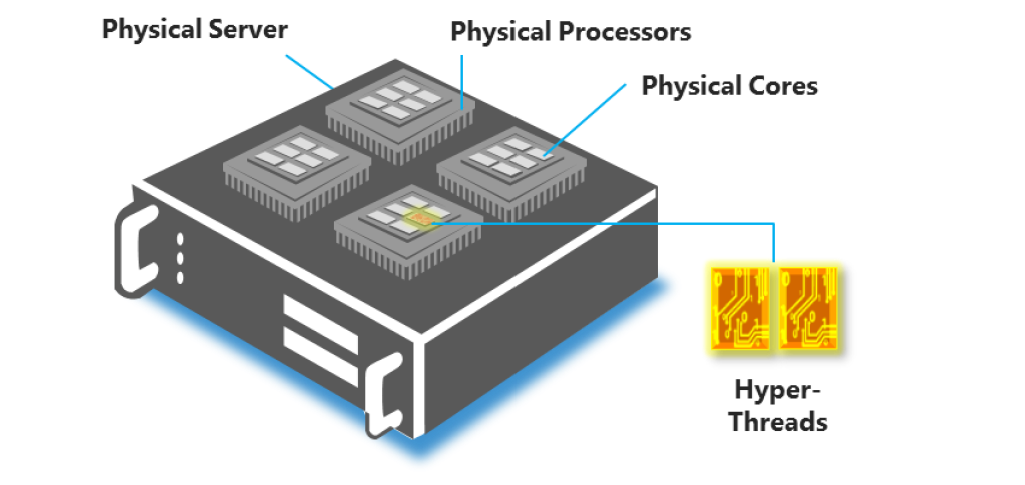
A core is an individual processing unit within a Central Processing Unit (CPU). It functions as the "brain" of the CPU, receiving instructions and executing calculations or operations to fulfill those instructions. A CPU may contain multiple cores, each capable of operating independently from the others.


Physical server showing physical processors, physical cores, and hardware threads

How Does VMware Define Core?

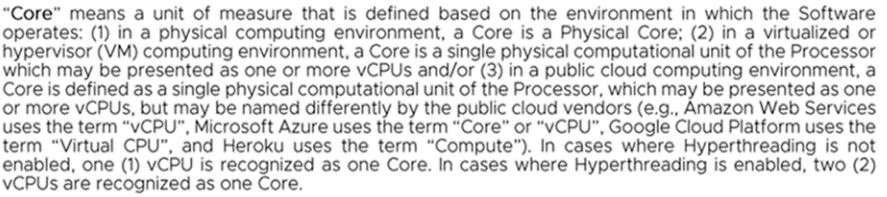
“Core” means a unit of measurement that is defined based on the environment in which the Software operates:

  1. in a physical computing environment, a Core is a Physical Core;
  2. in a virtualized or hypervisor (VM) computing environment, a Core is a single physical computational unit of the Processor which may be presented as one or more vCPUs and/or
  3. in a public cloud computing environment, a Core is defined as a single physical computational unit of the Processor, which may be presented as one or more vCPUs, but may be named differently by the public cloud vendors (e.g., Amazon Web Services uses the term “vCPU”, Microsoft Azure uses the term “Core” or “vCPU”, Google Cloud Platform uses the term “Virtual CPU”, and Heroku uses the term “Compute”).
  4. In cases where Hyperthreading is not enabled, one (1) vCPU is recognized as one Core. In cases where Hyperthreading is enabled, two (2) vCPUs are recognized as one Core.

VMware, After Getting Acquired by Broadcom, Changed Its Licensing Model From Processor to Core.

Adding to the complexity, VMware has transitioned to a new licensing model based on the number of cores in a Processor rather than the previous model, which was based on the number of processors.

Let’s break down how it works:

Subscription-Based: The core-based licensing model is subscription-based “Only.” This means you pay a recurring fee to use the software, for example, on a rental basis.

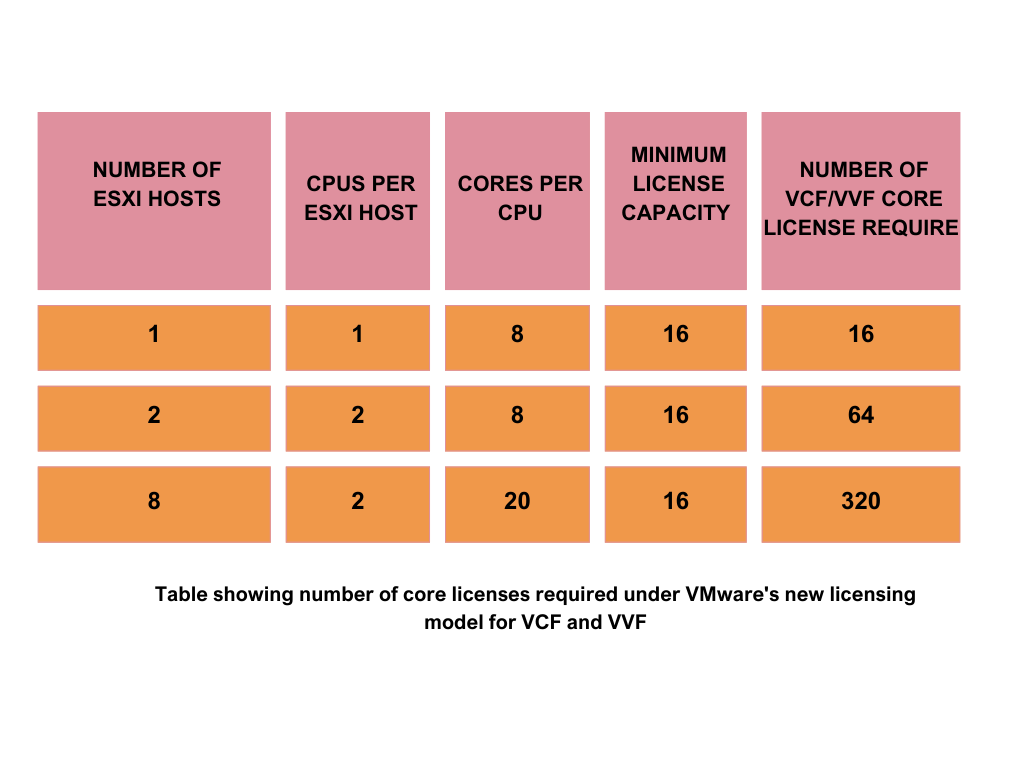
Minimum License Capacity: For VVF and VCF, customers must purchase a minimum license capacity of 16 cores per CPU. This means that even if your processors each have fewer than 16 cores, you’ll pay for 16 cores anyway.

Calculation of Capacity: To calculate the capacity needed for your environment, you need the total number of physical cores for each CPU on all ESXi hosts individually in your environment and then sum it up.

Example: To illustrate, suppose you have a single ESXi host in your inventory with a single CPU that has 8 cores. In this case, you are required to buy a subscription capacity for 16 cores per CPU, as this is the least license capacity available. If you have two ESXi hosts, each with two CPUs and each CPU having 8 cores, you would require a total of 64 core licenses.

VSAN Capacity Now Comes Bundled With VMware Cloud Foundation (VCF) and VMware vSphere Foundation (VVF)

vSAN capacity is now included in the VMware Cloud Foundation (VCF) and VMware vSphere Foundation (VVF) bundles. vSAN, which is a storage solution, is integrated with vSphere and managed through a single platform.

For VMware Cloud Foundation (VCF), the licensing model stipulates that each core license bought provides 1 Tebibyte (TiB) of vSAN capacity.

In the VMware vSphere Foundation (VVF) case, the licensing model grants 100 Gibibytes (GiB) of vSAN capacity for each core license purchased.

Additional capacity used must be purchased using the Add-on SKU.

vSAN TiB Licensing Metric

VMware’s vSAN, a software-defined storage solution, employs a distinctive licensing metric based on tebibytes (TiB). This metric considers the total usable capacity of your vSAN datastore, quantified in TiBs.

What is a TiB?

A tebibyte (TiB) is a unit of digital storage equal to 2^40 bytes, which is roughly 1.1 times the size of a traditional terabyte (TB) based on a power of 10. TiB (Tebibyte) is a different unit to a TB (Terabyte) commonly used for storage. While they sound similar, a TiB is actually about 10% larger than a TB. This seemingly small difference translates to a significant distinction in licensing costs.

 Difference between Tib, GiB and TB, GB:


Table showing number of TiB licenses required for vSAN under VMware new licensing model.


Overall, VCF is advantageous if you are utilizing VSAN or considering its use in the future.

Broadcom is offering VSAN at no cost as part of a bundle to encourage customer adoption/addiction to VSAN and other included products.

LDS Recommendations:
Assess the New Consumption Metrics by Conducting an Effective License Positioning (ELP)

VMware Enterprise License Position will clearly illustrate the consumption levels under both the old and new models and demonstrate the cost implications of each.

Optimize and Right Size Deployments Before Renewal to Reduce Renewal Cost

The era of deploying vSphere without careful planning has passed. Developing a proactive approach to managing your resources efficiently by creating an Enterprise License Position is essential. This strategy ensures that you only invest in what is necessary, reducing future renewal expenses.

Do Not Run Any Scripts or Provide Outputs to VMware/Broadcom Sales Reps 

Do not run any scripts or provide data as requested by Broadcom sales representatives. Specially Counting Cores for VMware Cloud Foundation and vSphere Foundation and TiBs for vSAN (95927). Be aware that this could be a stealth backdoor attempt to audit your VMware deployments. Executing these scripts and sharing the outputs with Broadcom has led to some customers facing unexpectedly high charges, often 10 to 40 times their usual costs. To safeguard your interests, it is critical to have any script outputs independently analyzed by a third party, then prioritize cleaning up and optimizing your environments and only share the most essential, high-level data with Broadcom for renewal purposes.

This cautious approach will help protect your business from potential financial pitfalls and any internal embarrassment after VMware sends an inflated bill to your senior management.

Negotiate with VMware, recognizing that you are dealing with an entirely new vendor:

a. Begin preparation and negotiations at least 6-8 months in advance.

b. Analyze current demand, consumption, and project future costs.

c. Benchmark your pricing; previous VMware pricing and discounts may no longer be applicable.

d. Be prepared for rigorous negotiations to maintain the terms of existing contracts, as Broadcom has shown reluctance to honor them.

e. Expect extensive negotiations if you intend to obtain credits for old perpetual licenses.

f. Involve C-level executives or senior management in discussions with VMware, as renewals are no longer straightforward processes that can be handled solely by the Infrastructure team. Broadcom is likely to rapidly escalate issues to your top executives.

Conclusion

Given the complex nature of these issues, if you lack the necessary in-house expertise or need assistance explaining these changes to your management, don't hesitate to contact Licensing Data Solutions. A thorough grasp of VMware's products and their uses can be obtained through an Effective License Position (ELP) analysis. It's important to understand the possible outcomes, including higher costs, more complicated management, and less flexibility and control. For the best and most effective ELP analysis, consider working with Licensing Data Solutions (LDS). Feel free to reach out for advice at This email address is being protected from spambots. You need JavaScript enabled to view it..

Licensing Data Solutions(LDS) is a leading provider of Audit Defense, Software Asset Managed Services , SaaS and Cloud FinOps Cost Saving Analysis,  for major software vendors such as IBM, SAP, Microsoft, Oracle, Quest, Autodesk, VMware, Salesforce, and ServiceNow. Our team of 35 analysts comprises former software compliance auditors with expertise in delivering exceptional services. At LDS, our clients benefit from cost savings of up to 30 percent on their software spend and up to 85 percent on their audit findings.

Also read more on this:

Broadcom Shakes the Ground Under VMware Customers: Comprehensive Guide to New VMware Licensing, Packaging, Reseller Changes in 2024

Please check our VMware Licensing Services

VMware Licensing Review

Introduction

On November 22, 2023, Broadcom made a significant impact on the IT industry by acquiring VMware for $69 billion, one of the most substantial technology transactions to date. Immediately after the acquisition was finalized, Broadcom quickly introduced significant alterations to the licensing model by ending perpetual licensing and major changes to the partner network, including how customers interact with resellers and Broadcom, as well as changes to the product packaging and bundling. This blog will cover these changes in detail, examining their effects on you as a customer. We will also provide advice on steps you can take to safeguard yourself and minimize the impact on your budgeting and licensing strategies.

Change 1 - VMware Ends Perpetual Licenses and Introduces Subscription Licensing

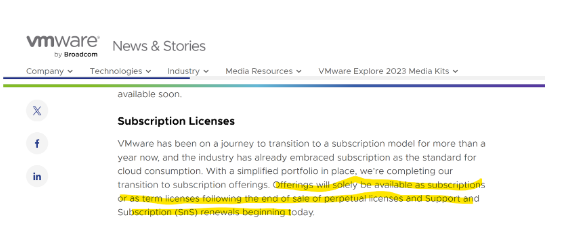
On December 11, 2023, VMware, now a subsidiary of Broadcom, announced a pivotal alteration in is licensing strategy, ceasing the sale of new perpetual licenses. Henceforth, VMware software will be exclusively accessible via subscription models. To clarify this change, the subscription tmodel may be compared to renting a residence or leasing a car; the license is not owned, yet it remains usable as long as the subscription fees are continually paid. Conversely, a perpetual license resembles the outright purchase of a residence or automobile; the license is owned indefinitely, with typically only nominal maintenance fees required in subsequent years. This shift towards subscription models is a trend increasingly adopted by software companies in recent years. However, Broadcom's decision to suddenly entirely eliminate perpetual licenses and forbid any new perpetual acquisitions has been met with disappointment and dismay among customers.

Please see the link to the official announcement below:

https://news.vmware.com/company/vmware-by-broadcom-business-transformation

VMware Perpetual License Phase-Out: Implications for Existing Customers

Shock at Contract Expiration and Forced Migration:

Clients currently engaged in an Enterprise License Agreement (ELA) or possessing active maintenance agreements will not experience immediate impacts from this change. They are permitted to utilize their perpetual licenses until the conclusion of their agreement or the expiration of their maintenance period.

Upon the termination of an ELA or active maintenance agreement, clients will be ineligible to receive future maintenance for their existing licenses under the old model, necessitating a forced transition to VMware’s subscription-based offerings.

Furthermore, should there be a requirement to procure any new products not encompassed within the ELA or existing agreements during the term of an ELA, such acquisitions must be made under the newly established subscription model.

Escalating Cost at Renewal

This evolution is advantageous for customers who favor operational expenditure (Opex) for their purchases. However, it poses challenges for those who prefer capital expenditure (Capex) strategies, aiming for significant upfront investment followed by reduced operational costs, and for customers who are using VMware software without active maintenance.

Customers of VMware are likely to experience an increase in costs upon renewal. This escalation can be attributed to the potential forfeiture of their existing investment in perpetual licenses. Despite assurances from Broadcom regarding the availability of a trade-up path, it has not demonstrated cost neutrality. Additionally, customers may encounter a progressive increase in expenses over time, as the subscription model tends to be more costly in the long term.

Strategic Recommendations to Customers

Understand That the Landscape Has Changed for Good

It is imperative for customers to recognize that the acquisition of VMware by Broadcom has fundamentally altered the operational landscape. The prevailing paradigms have undergone a significant shift, rendering the former status quo with VMware untenable. Clients must initiate their preparatory measures promptly, adopting a strategic approach akin to that utilized in negotiations with Microsoft or Oracle.

Understand Usage and Simulate Cost and Quantity Under the New Subscription Model

Carry out a detailed review of your current usage against what you have purchased. This evaluation, called the Enterprise License Position, gives a clear picture of how you are using VMware resources compared to what you have bought. It helps in understanding your current usage, as well as estimating future usage, if you switch to a subscription model. Based on this assessment, it is advisable for customers to adjust their deployments to prevent an unexpected rise in costs.

Change 2 - Broadcom Major Changes to the Reseller/Partner Network

Furthermore, alongside the transition from perpetual licensing to subscription-based models, Broadcom has implemented substantial modifications to its partner/reseller network. These changes could significantly alter your interactions with VMware.

https://news.vmware.com/partners/building-a-simplified-stronger-advantage-program-for-vmware-by-broadcom

Broadcom's Strategic Shift in Eliminating Resellers for Strategic Accounts: Broadcom has initiated a notable strategic shift by opting to directly oversee its major VMware accounts (2000 as per unofficial estimates), diverging from its prior approach. This repositions partners, who played a crucial role in the management of these accounts, to a sidelined status. Broadcom is now designating substantial accounts as Strategic Accounts, and will engage with them directly. Consequently, entities recognized as Strategic Accounts will no longer have the liberty to procure through their resellers, but will instead be obligated to conduct transactions directly with Broadcom.

Narrowing of Reseller Network: Broadcom has decided to reduce the number of its resellers, especially eliminating small ones. This change will greatly affect smaller businesses because they will no longer be able to sell Broadcom products through their current reseller. They will need to find and work with a larger reseller instead.

Consequences of Partner Alterations for Customers:

Direct Interaction With Broadcom and Increase in Cost: Broadcom is making changes that will reduce the support and incentives previously provided by resellers, especially for large or strategic accounts. This means that instead of receiving personalized support from resellers, these accounts will have to deal directly with Broadcom. This shift could result in the loss of discounts due to Broadcom's tough negotiating stance. Moreover, without a reseller acting as an intermediary, there's a higher chance of audits. If Broadcom's sales staff finds the terms of a deal unsatisfactory or decides to examine an account closely, they may be more likely to nominate the customer for a software licensing audit.

For smaller customers, this adjustment will likely lead to increased costs, as they will now need to engage with larger resellers. These bigger entities may not place as much emphasis on their relationship or exert the same effort to secure discounts that smaller resellers previously managed to obtain.

Guidance for Customers on How to Navigate This Reseller Change:
For small customers, verify whether your current reseller remains within the Broadcom network. If not, initiate efforts to build connections with a reputable reseller.
For large customers, prepare for direct negotiations with Broadcom. Begin preparations for VMware/Broadcom discussions several months prior to your contract's expiration. Consider enlisting third-party assistance, such as LDS, which can aid in comprehending the alterations, educating your internal management, analyzing your current and future consumption and costs, benchmarking these costs, and facilitating negotiation and adaptation to this new standard.
Change 3 - VMware Draconian Product Packaging/Bundling Changes!

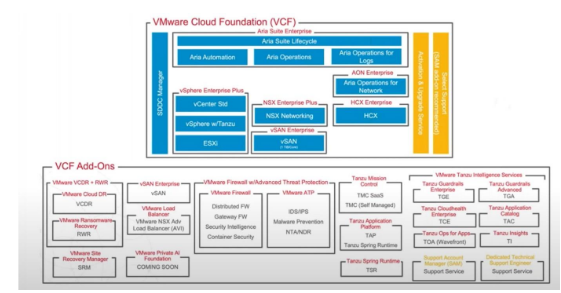
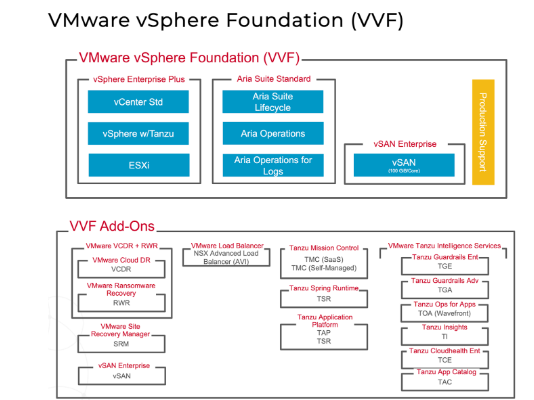
In conjunction with the transition from perpetual licensing to subscription models and the consolidation of resellers and partners, a significant simplification and consolidation in product packaging was also unveiled. The array of stock-keeping units (SKUs) has been streamlined, resulting in the reduction to four primary SKUs: 1) VMware Cloud Foundation, 2) VMware vSphere Foundation, 3) VMware Standard, and 4) VMware Essentials. 

Let’s delve into the landscape of VMware’s product offerings:

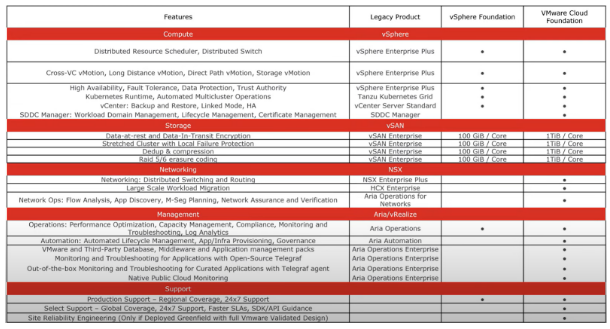
  1.  VMware Cloud Foundation (VCF): 
  • vSphere Enterprise Plus
  • vSAN Enterprise (1TiB per core) Not to be confused with TB (TeraByte) which is a different metric
  • Tanzu Kubernetes Grid
  • SDDC Manager
  • HCX Enterprise
  • NSX Enterprise Plus
  • Aria Operations
  • Aria Automation
  • Aria Operations Enterprise
  • Select Support
  • Site Reliability Engineering

  1.  VMware vSphere Foundation (VVF): 
  • vSphere Enterprise Plus
  • vSAN Enterprise (100 GiB per core) Not to be confused with GegaByte GB
  • Tanzu Kubernetes Grid
  • Aria Operations


Feature difference between VCF and VVF

  1. vSphere Standard
  • vSphere Standard
  • vCenter Standard
  1. vSphere Essential Plus Kit
  • vSphere Essentials
  • vCenter Essentials Plus
  • Limitations
  • Maximum of 3 hosts w/up to 96 Cores
Perspectives on the Recent Packaging Changes:
  • This transformation is favorable for individuals fully committed to utilizing VMware; however, it poses disadvantages for customers who do not employ the complete suite of products, such as Aria/NSX.
  • The implementation of product bundling is anticipated to lead to a price augmentation ranging from two to five times for all customers, attributable to the financial implications of acquiring these bundles.
  • The bundling strategy is likely to culminate in the underutilization of software, resulting in resources being expended on unused software.
  • VMware aims to incentivize customers to adopt more products from its suite, potentially altering bundle offerings or introducing premium versions of these products in the future to extract additional revenue from clients.
LDS Recommendations in Handling This Product Bundling

Comprehend Actual Utilization and Project Future Consumption: Clients are encouraged to ascertain both their present and anticipated future utilization at the SKU level, and to conduct a comparative analysis of current versus future costs. Leveraging this analysis, customers should negotiate discounts with VMware/Broadcom.

Elevate This Matter to the Level of Executive Management: VMware renewal is no longer a task the infrastructure team can manage on its own. Comprehending the alterations and devising either a temporary or prolonged strategy now requires the attention and decision-making of either the Chief Information Officer (CIO) or another high-ranking executive.

Investigate Substitute Strategies: It is advisable to examine other virtualization solutions that may present a more economical option, especially those characterized by stable pricing structures and negligible concealed expenses. Furthermore, it is anticipated that the future will be marked by escalating prices, a decline in development and customer support, intensified sales representative tactics, and rigorous software compliance audits. 

In discussions with our clientele, the following alternatives have been mentioned:

  • Transitioning to cloud services such as Azure, AWS, or GCP
  • Exploring Microsoft Hyper-V
  • Evaluating Nautanix
  • Exploring Verge.io
  • Investigating Proxmox
  • Transitioning to Physical Servers

Engage in Strategic Negotiations: Upon subscription renewal, it is advisable to enter into assertive negotiations with VMware to uncover possible concessions. Benchmark your agreement to ascertain the standard discounts currently provided by Broadcom and recognize the shift in dynamics as you are now interacting with a representative from Broadcom, rather than the familiar VMware representative.

Conclusion

In summary, Broadcom has implemented significant alterations to VMware's packaging, licensing model, and reseller network. These changes are poised to deeply affect your association with VMware. It is advisable for clients to recognize that the operating framework has fundamentally transformed and to take the necessary measures to comprehend their usage, and to prepare for extensive and forceful negotiations with VMware. Additionally, it is imperative for this matter to be escalated to the level of Chief Information Officer (CIO) and to devise a strategy for assessing alternative Hypervisor Technologies. Should there be a lack of expertise internally, or a requirement for an external consultant to provide enlightenment on these modifications, assess your actual usage, project your future VMware cost, and explore alternative options, then please do not hesitate to contact Mark Thaver at This email address is being protected from spambots. You need JavaScript enabled to view it..

Please check our VMware Licensing Services

VMware Licensing Review


Page 1 of 3

Thumbs Gallery

Licensing Data Solutions

If you would like to learn about Software Compliance Data Solutions contact us today:

Address: 475 Wall St Princeton, NJ 08540

Telephone: (646) 808 - 5897

Email: info@licensingdatasolutions.com

Sorry, this website uses features that your browser doesn’t support. Upgrade to a newer version of Firefox, Chrome, Safari, or Edge and you’ll be all set.

{/* */}