Microsoft 365 July 2026 Price Increases: What Changed, What It Will Cost, and How to Reduce Your Renewal Spend
The commercial pricing changes that Microsoft introduced on July 1, 2026 are now in force, and they include a number of price hikes, new bundled features, and some important points to take into account when renewing Microsoft 365 subscriptions.
The price rises vary from about 5 per cent to 43 per cent depending on the plan, and it is the Microsoft 365 F3 and E3 plans that experience the biggest increases. Microsoft has also included new security features, Intune, Copilot Chat, and storage options in some of the suites.
For customers who already have subscriptions or are covered by an Enterprise Agreement, the financial effect won't be felt right away but will occur at the next renewal. Because of this, the months before the renewal date are especially important, particularly since Microsoft has dropped the automatic volume-based discounts. Businesses should therefore examine their present license mix, get rid of any licenses that are not being used, adjust the number of users to match their actual needs, and decide if the new Microsoft capabilities bundled together can take the place of the separate products, add-ons or third-party tools which they are currently paying for.
The aim should not just be to accept Microsoft’s price rise; with proper preparation, customers could perhaps offset part—maybe even all—of the extra cost by means of license optimization, product consolidation, and better renewal negotiations.
Key Points:
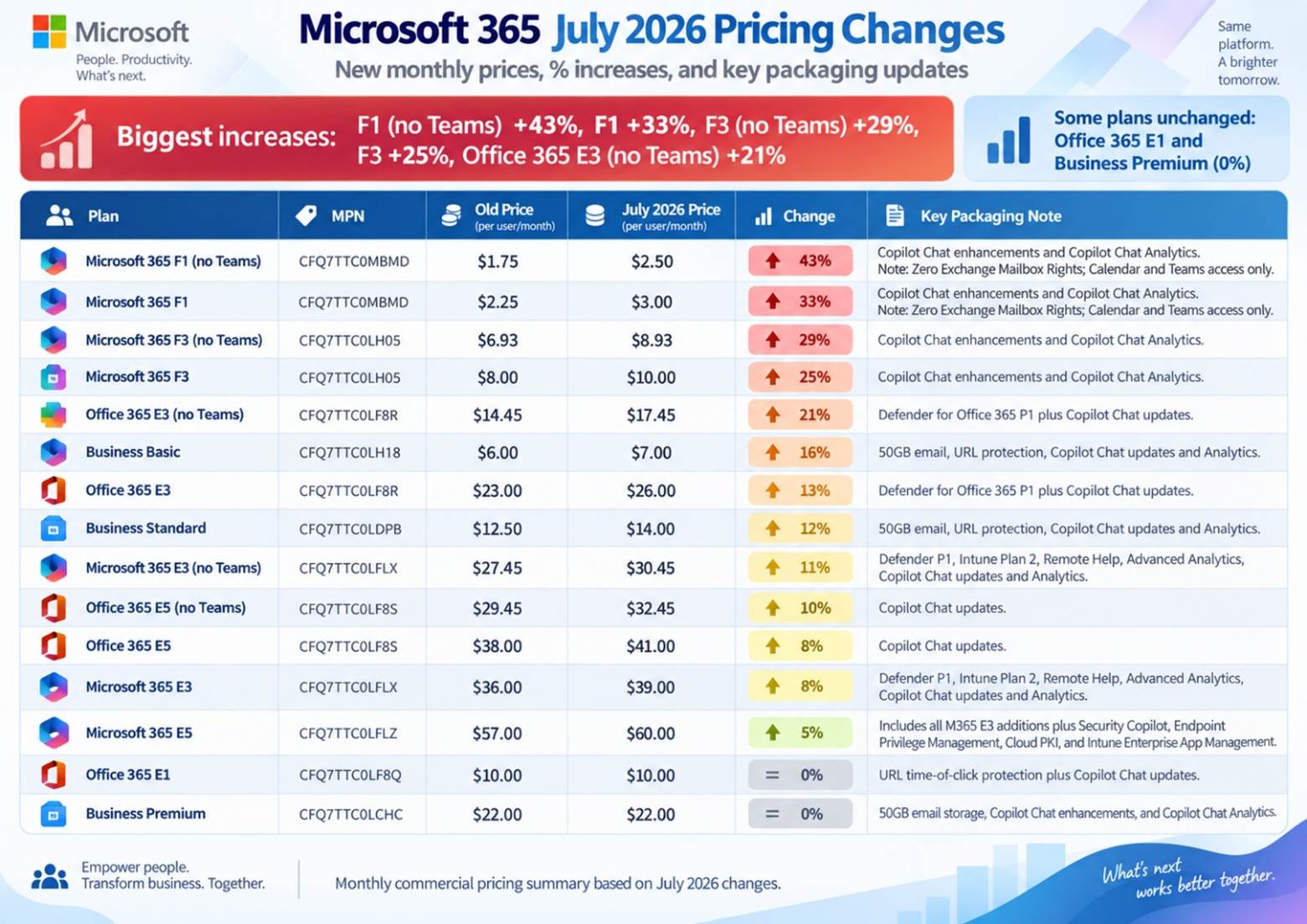
● Frontline price rises: The frontline plans experience the largest percentage increases, with Microsoft 365 F1 going up by 33% when Teams is included and by 43% when Teams is not included, and F3 increasing by 25% when Teams is included and by 29% when Teams is not included.
● The prices for the Core Enterprise Suite are also rising: Office 365 E3 is now $26 per user per month, Microsoft 365 E3 has been set at $39, and Microsoft 365 E5 at $60 according to the published U.S. commercial list pricing.
● Added value and capabilities: Microsoft is providing new features to certain suites, such as Defender for Office 365 Plan 1, the Intune capabilities, the Copilot Chat improvements, and the Security Copilot capacity for eligible Microsoft 365 E5/E7 customers.
● When it comes to renewal and agreement timing, current customers typically switch to the new pricing at their following renewal. The mid-term pricing will vary according to the type of agreement, the subscription term, and whether the customer is adding more of a price-protected SKU or purchasing a new SKU.
The core updates are shown in the table below for the July 2026 update, which applies to certain Microsoft 365, Office 365, Frontline, Business, and standalone products, including the published U.S. commercial list prices, the percentage changes, and the key packaging additions.
Microsoft 365 Commercial Price Increase Table
| Plan | Plan Type | Part Number | Old Price | July 2026 Price | Change | Key Packaging Note |
|---|---|---|---|---|---|---|
| Office 365 E1 | Suite | CFQ7TTC0LF8Q | $10.00 | $10.00 | 0% | URL time-of-click protection + Copilot Chat updates |
| Office 365 E3 | Suite | CFQ7TTC0LF8R | $23.00 | $26.00 | +13% | Defender for Office 365 P1 + Copilot Chat updates |
| Office 365 E3 (no Teams) | No Teams | CFQ7TTC0LF8R | $14.45 | $17.45 | +20.8% | Defender for Office 365 P1 + Copilot Chat updates |
| Office 365 E5 | Suite | CFQ7TTC0LF8S | $38.00 | $41.00 | +8% | Copilot Chat updates |
| Office 365 E5 (no Teams) | No Teams | CFQ7TTC0LF8S | $29.45 | $32.45 | +10% | Copilot Chat updates |
The Business Basic, Business Standard, and Business Premium plans within Microsoft 365 Business are restricted to a maximum of 300 seats per tenant in the basic plans. Any organization which has more than 300 users must transfer its excess seats to Enterprise plans, for example Office 365 E3/E5 or Microsoft 365 E5/E3.
Frontline and No-Teams Enterprise Suites See Notable Price Increases
● The cost of Microsoft 365 F1 with Teams has increased from $2.25 to $3.00 per user per month (an increase of 33%).
● The cost of Microsoft 365 F1 without Teams rises from $1.75 to $2.50 per user per month (an increase of 43%).
● The price of Microsoft 365 F3 with Teams rises from $8.00 to $10.00 per user per month (an increase of 25%).
● The cost of Microsoft 365 F3 without Teams rises from $6.93 to $8.93 per user per month (an increase of 29%).
● The cost of Office 365 E3 without Teams goes up from $14.45 to $17.45 per user per month (an increase of 20.8%).
● The cost of Office 365 E5 without Teams goes from $29.45 to $32.45 per user per month (an increase of 10%).
● The price of Microsoft 365 E3 without Teams goes from $27.45 to $30.45 per user per month (an increase of 10.9%).
Technical Limits and Mailbox Rights:
● Microsoft 365 F1 does not feature Exchange mailbox rights, so F1 users cannot have a mailbox assigned to them and any attempt to create one might fail or result in compliance problems. F1 provides access to Teams via the web and mobile versions as well as only the Calendar features.
● Microsoft 365 F3: has a 2 GB limit on the Exchange mailbox and only supports Outlook on the web and mobile; in contrast, the Enterprise plans, such as E3 and E5, provide full 100 GB mailboxes.
The rules regarding licensing eligibility provide that, in accordance with the Microsoft Product Terms, Frontline F1/F3 licenses can only be allocated to employees who satisfy the required device rules, such as having a primary device with a screen size of 10.9 inches or less, or who use dedicated shared devices during different shifts.
Standalone Applications & Add-on Price Adjustments
In addition to integrated suites, several standalone licensing components experienced rate adjustments during this commercial pricing cycle:
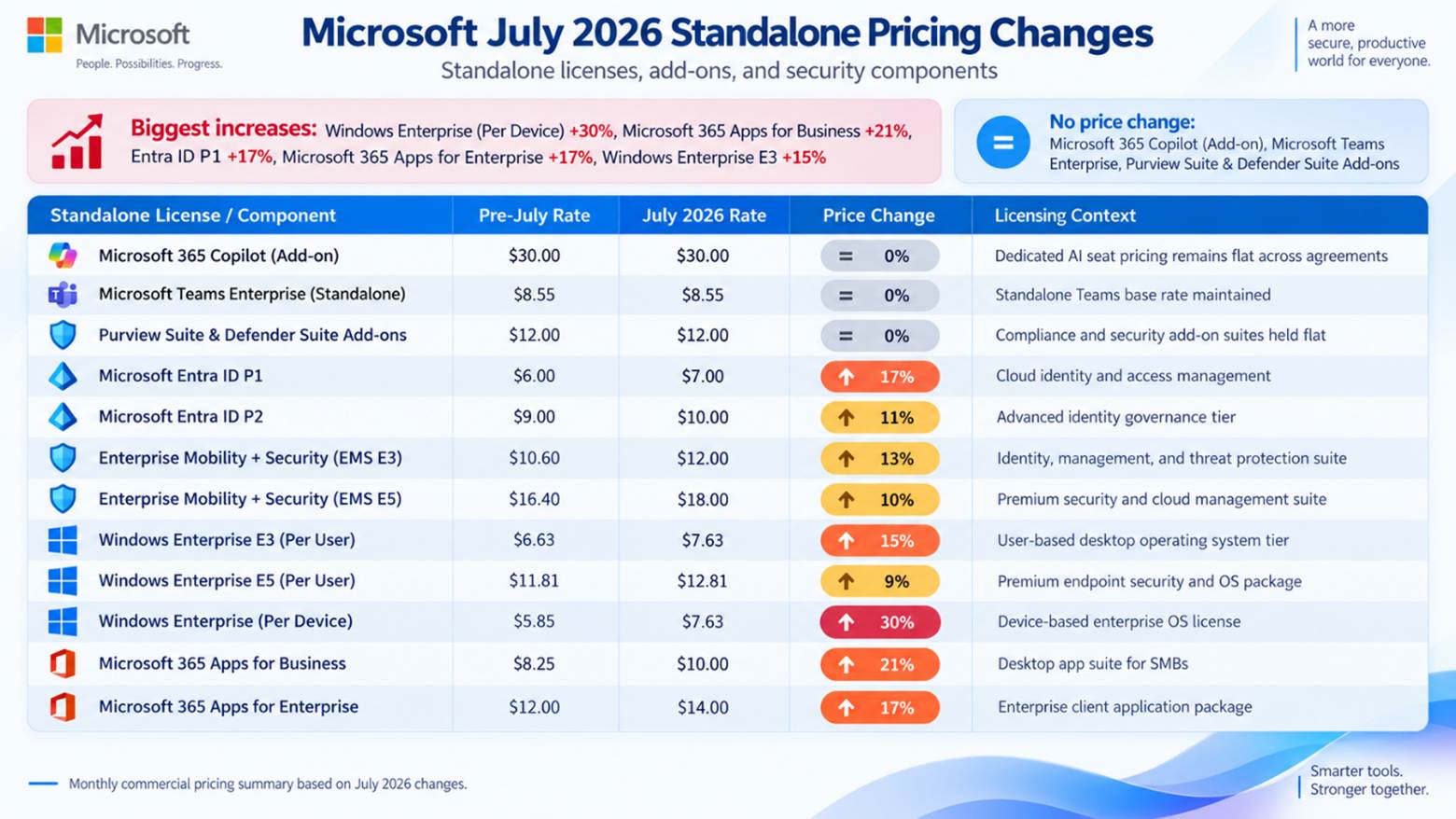
| Standalone License / Component | Pre-July Rate | July 2026 Rate | Price Change | Licensing Context |
|---|---|---|---|---|
| Microsoft 365 Copilot (Add-on) | $30.00 | $30.00 | 0% | Dedicated AI seat pricing remains flat across agreements |
| Microsoft Teams Enterprise (Standalone) | $8.55 | $8.55 | 0% | Standalone Teams base rate maintained |
| Purview Suite & Defender Suite Add-ons | $12.00 | $12.00 | 0% | Compliance and security add-on suites held flat |
| Microsoft Entra ID P1 | $6.00 | $7.00 | +16.7% | Cloud identity and access management |
| Microsoft Entra ID P2 | $9.00 | $10.00 | +11.1% | Advanced identity governance tier |
| Enterprise Mobility + Security (EMS E3) | $10.60 | $12.00 | +13.2% | Identity, management, and threat protection suite |
| Enterprise Mobility + Security (EMS E5) | $16.40 | $18.00 | +9.8% | Premium security and cloud management suite |
| Windows Enterprise E3 (Per User) | $6.63 | $7.63 | +15.1% | User-based desktop operating system tier |
| Windows Enterprise E5 (Per User) | $11.81 | $12.81 | +8.5% | Premium endpoint security and OS package |
| Windows Enterprise (Per Device) | $5.85 | $7.63 | +30.4% | Device-based enterprise OS license |
| Microsoft 365 Apps for Business | $8.25 | $10.00 | +21.2% | Desktop app suite for SMBs |
| Microsoft 365 Apps for Enterprise | $12.00 | $14.00 | +16.7% | Enterprise client application package |
Enterprise Agreement (EA) & CSP Renewal Guidance
Customers of an Enterprise Agreement (EA) will retain their locked-in prices for the entire duration of the active multi-year term. If the EA expires after July 1, 2026, the products that are enrolled will be subject to the revised rates at the time of renewal, and any new discounts will have to be negotiated.
Critical comparison between EA and CSP regarding mid-term additions and price protection.
Price protection and mid-term purchasing rules operate differently across Enterprise Agreement and Cloud Solution Provider models:
● For customers who have Enterprise Agreements (EA), price protection for the products they have enrolled is maintained throughout the multi-year term via the Customer Price Sheet (CPS): any additional seats for SKUs that are already listed on the CPS will be charged at the contracted rate, whereas new SKUs added during the term will be priced at the list rate that was in effect at the time they were ordered.
● For Cloud Solution Provider (CSP) subscriptions: instead of using an EA Customer Price Sheet, price protection is linked to the term of the active subscription, for example 12 or 36 months. The rates stay fixed during that term and are then changed to the new prices at the following scheduled renewal.
Strategic License Optimization & Cost Reduction Framework
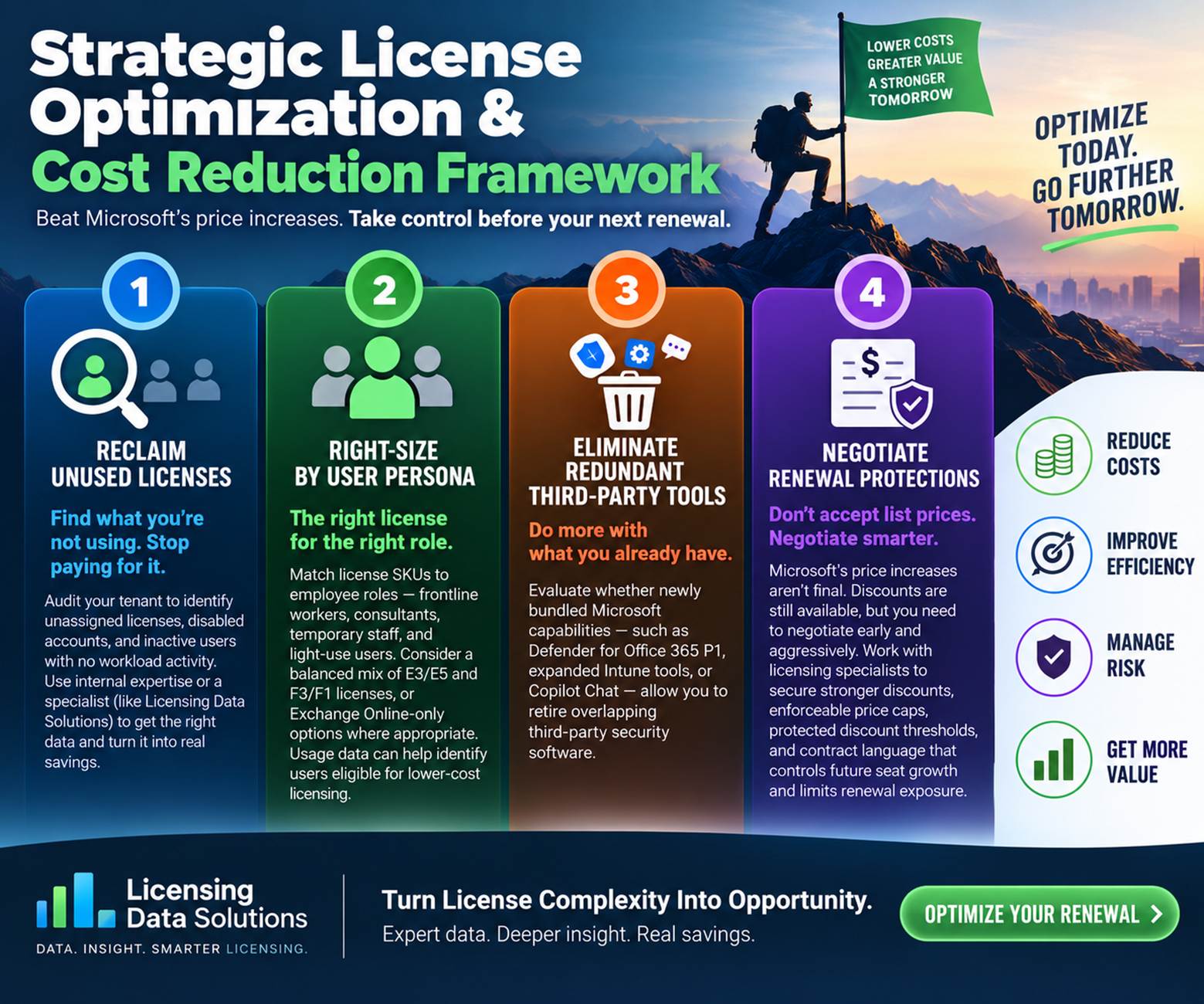
To mitigate the financial impact of Microsoft’s commercial price increases, CIO’s, Software Asset Managers (SAMs), and procurement leads should execute these five core optimization steps before committing to their next renewal:
1. Recover licenses that are not being used: As the total cost is determined by the SKU price times the quantity, organizations can lessen the effect on their budget by examining demand, consumption, and the suitability of the licenses. Carry out a comprehensive audit across all tenants to spot unused licenses, disabled accounts, and inactive users who have no workload activity. If the organization lacks in-house expertise in licensing, it might be worthwhile to hire a specialist such as Licensing Data Solutions to gather the correct deployment data, interpret the complicated licensing rules, and find actionable opportunities for reclaiming licenses.
2. Tailor the licenses to the different types of users: match the license SKUs to employee roles by setting up separate profiles for groups like frontline workers, consultants, temporary staff, and light-use users. Even though IT teams might prefer to assign E3 or E5 licenses to everyone, the increasing costs make it more difficult to justify adopting a one-size-fits-all strategy. Many companies are able to cut back on their spending by using a combination of E3/E5 and F3/F1 licenses, or by choosing Exchange Online-only options where suitable. Licensing Data Solutions can examine usage data in order to spot user groups that may qualify for more affordable licensing.
3. Check whether the new features that have been bundled can result in dropping of other third party software—such as Defender for Office 365 P1, the enhanced Intune management tools, or Copilot Chat—mean that your business can get rid of its existing third-party security software that overlaps with these capabilities.
4. Negotiate the renewal protections: it should not be assumed that the price increases published by Microsoft are final. Although discounts are still available for these SKUs, it is necessary to negotiate vigorously and as early as possible. Collaborate with licensing specialists in order to obtain stronger discounts, enforceable price caps, protected discount thresholds, and contractual terms which control future seat growth and reduce renewal exposure.
How Licensing Data Solutions (LDS) Can Help
Licensing Data Solutions (LDS) helps enterprise procurement and IT leaders navigate Microsoft renewals through independent market benchmarking, workload analysis, and commercial strategy:
● Office 365 License Optimization Report: This detailed report provides a clear and audit-ready overview of your Office 365 environment by highlighting active, unassigned, duplicate, dormant, and stale licenses. It reveals practical ways to adjust user allocations, recover unused seats, and cut down on unnecessary licensing expenses prior to your next Microsoft renewal. Organizations generally manage to reduce their Office 365 licensing costs by 15% to 20% as a result of this type of analysis. If you would like to arrange your review, please contact Mark Thaver at This email address is being protected from spambots. You need JavaScript enabled to view it..
● Persona and usage optimization: regain seats that have been inactive and ensure that the licenses are properly sized in accordance with the policy for the M365 E3, E5, F3, and Business plans.
Conclusion: Taking Control of Your Next Microsoft Renewal
Since the commercial price changes introduced by Microsoft in July 2026 are now in force, businesses should turn their focus to the next renewal point. Although those organizations that have large Frontline deployments might experience the highest percentage increases, each customer should check their actual workload usage before agreeing to the higher baseline prices.
It is not necessary for higher published list prices to mean that the budget should also increase. Procurement teams can keep costs under control and obtain better renewal protections before their contract date by reclaiming inactive seats, enforcing the Frontline eligibility rules, assessing the value of the bundled security features, and separately benchmarking the commercial terms.