Salesforce Core, Advanced & Max: What the New Editions Mean for Pricing, Flex Credits, and Your Next Renewal
Salesforce has replaced its Enterprise, Unlimited, and Agentforce 1 editions with three consolidated tiers. Here is what changed, what the bundles include, and how customers can prepare before renewal.
On September 3, 2026, Salesforce introduced the Core, Advanced, and Max editions for Sales Cloud and Service Cloud, replacing the Enterprise, Unlimited, and Agentforce 1 editions. Current U.S. list prices are $195 for Core, $395 for Advanced, and $550 for Max per user per month, billed annually. Pricing for the new Industry editions will take effect later in fall 2026.
Existing Salesforce contracts and SELAs remain unchanged until customers renew or make additional purchases. This article summarizes the packaging updates, details what each bundle includes, and recommends steps customers can take to prepare.
per user / month
per user / month
per user / month
What’s included in the new bundles?
Sales Cloud edition matrix
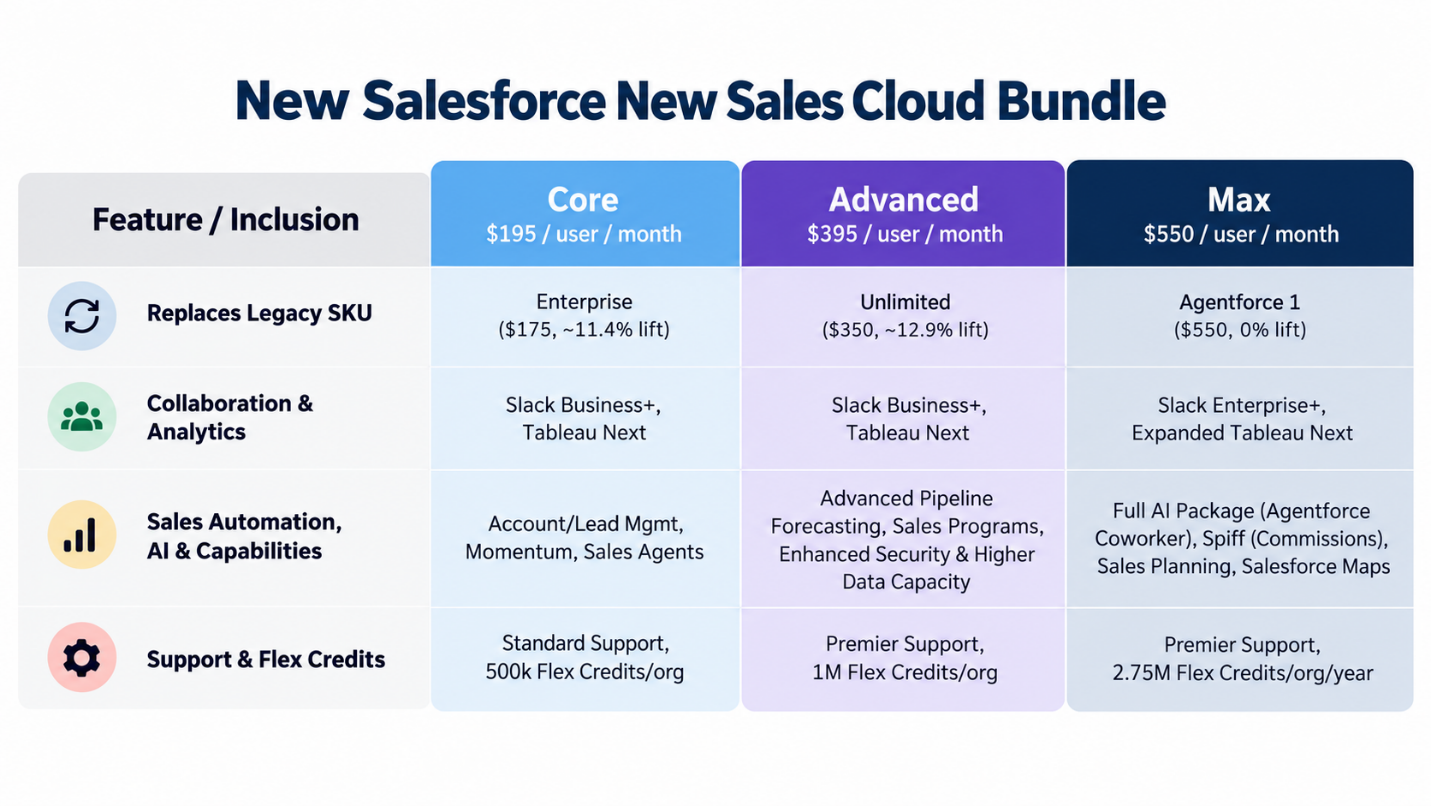
View an accessible text version of the Sales Cloud matrix
| Feature / inclusion | Core — $195/user/month | Advanced — $395/user/month | Max — $550/user/month |
|---|---|---|---|
| Replaces legacy SKU | Enterprise ($175, ~11.4% lift) | Unlimited ($350, ~12.9% lift) | Agentforce 1 ($550, 0% lift) |
| Collaboration & analytics | Slack Business+; Tableau Next | Slack Business+; Tableau Next | Slack Enterprise+; expanded Tableau Next |
| Sales automation, AI & capabilities | Account/lead management; Momentum; Sales Agents | Advanced pipeline forecasting; Sales Programs; enhanced security and higher data capacity | Full AI package (Agentforce Coworker); Spiff; Sales Planning; Salesforce Maps |
| Support & Flex Credits | Standard Support; 500,000 Flex Credits/org | Premier Support; 1 million Flex Credits/org | Premier Support; 2.75 million Flex Credits/org/year |
Service Cloud edition matrix
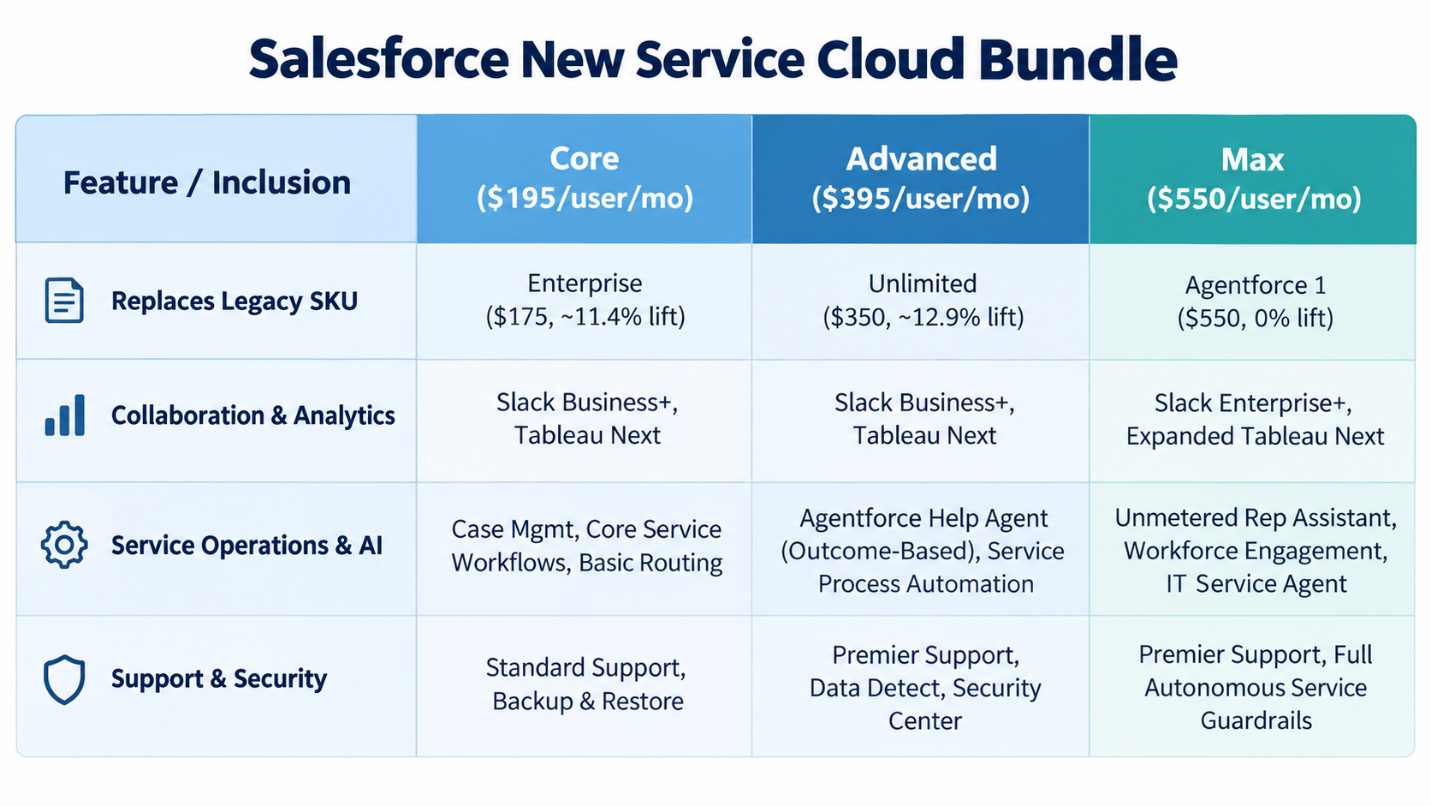
View an accessible text version of the Service Cloud matrix
| Feature / inclusion | Core — $195/user/month | Advanced — $395/user/month | Max — $550/user/month |
|---|---|---|---|
| Replaces legacy SKU | Enterprise ($175, ~11.4% lift) | Unlimited ($350, ~12.9% lift) | Agentforce 1 ($550, 0% lift) |
| Collaboration & analytics | Slack Business+; Tableau Next | Slack Business+; Tableau Next | Slack Enterprise+; expanded Tableau Next |
| Service operations & AI | Case management; core service workflows; basic routing | Agentforce Help Agent (outcome-based); service process automation | Unmetered Rep Assistant; Workforce Engagement; IT Service Agent |
| Support & security | Standard Support; Backup & Restore | Premier Support; Data Detect; Security Center | Premier Support; full autonomous service guardrails |
Purchasing options and renewal considerations
Salesforce customers with active contracts retain their legacy packages and existing price protections. However, the new packaging applies to additional license purchases and early renewals.
- Agentforce 1 migration: Existing Agentforce 1 customers can upgrade to Max ($550) at no additional cost.
- Starter and Pro Suite availability: Starter Suite ($25 per user per month) and Pro Suite ($100 per user per month) remain available on Salesforce’s public pricing pages.
- Enterprise and Unlimited: These bundles will transition to Core and Advanced.
Salesforce value claims vs. procurement reality
Salesforce positions the consolidated tiers as higher-value packages and uses these claims to support the price increases over legacy SKUs:
- Included in base rates: Slack, Tableau Next analytics, native security tools, Premier Success for Advanced and Max, annual organization-level Flex Credit pools, and planned Headless 360 access for Max.
- Billed separately: Flex Credit usage above annual organization limits, custom third-party AI models, and specialized Industry Cloud data add-ons.
- Not included: MuleSoft and Informatica are not part of the bundle.
- Core tier: Marketed as providing 70% more value than the legacy Enterprise edition.
- Advanced tier: Marketed as providing more than 50% greater value than the legacy Unlimited edition.
- Max tier: Marketed as providing nearly 60% more value than the legacy Agentforce 1 edition.
Procurement takeaway: Despite Salesforce’s added-value positioning, customers should assess whether the bundled capabilities provide meaningful value for their organization.
How many Flex Credits are included?
The main operational concern with Salesforce’s new tiers is how AI capacity is measured and allocated. Although “millions of Flex Credits” may sound generous, customer teams should examine the actual usage limits, rate-card calculations, and overage rules.
The per-organization catch and real usage math
Flex Credits are allocated annually at the organization level, so purchasing additional user licenses does not increase the credit pool.
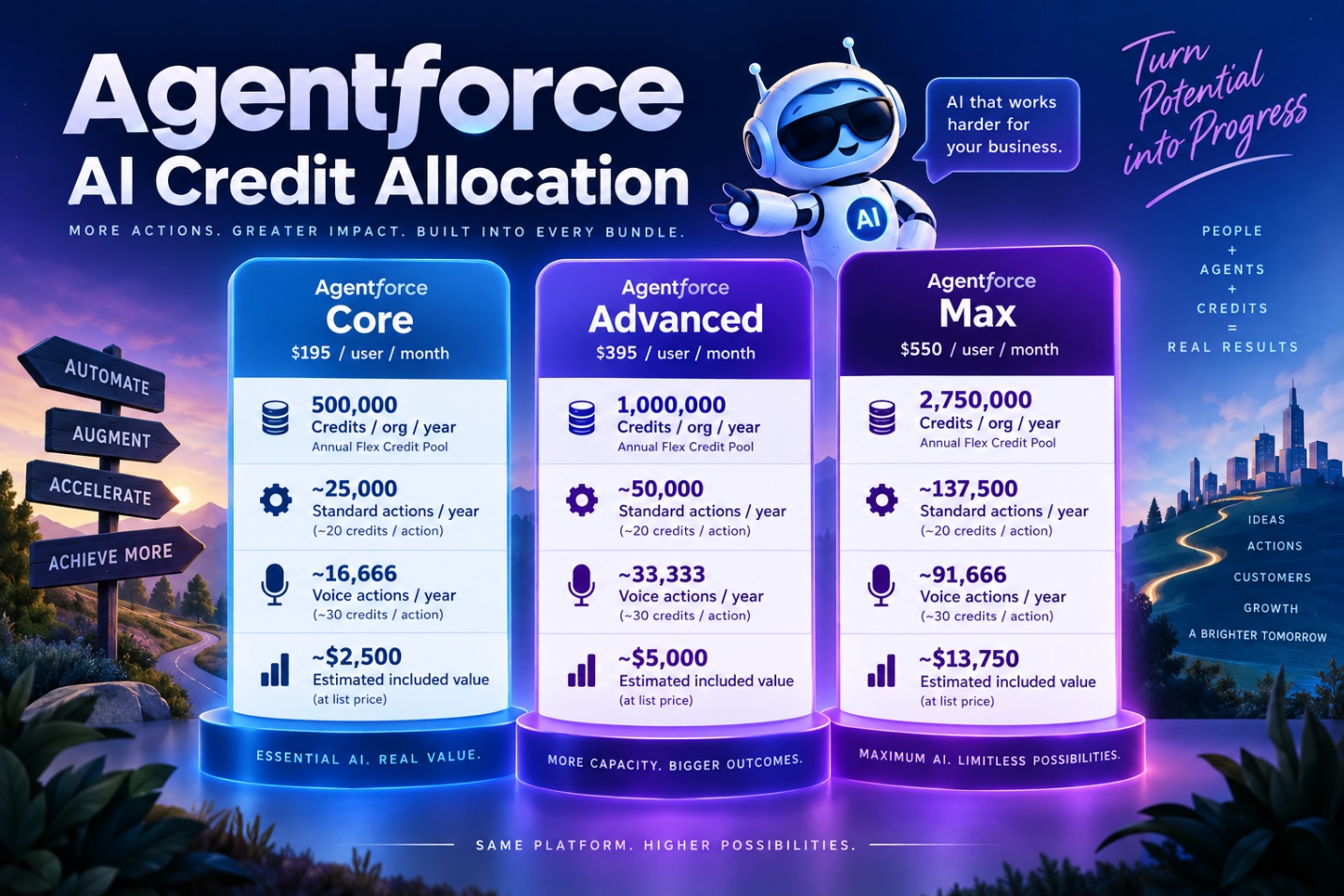
View an accessible text version of the Flex Credit allocation
| Allocation | Core | Advanced | Max |
|---|---|---|---|
| Credits / org / year | 500,000 | 1,000,000 | 2,750,000 |
| Standard actions / year | ~25,000 at ~20 credits/action | ~50,000 at ~20 credits/action | ~137,500 at ~20 credits/action |
| Voice actions / year | ~16,666 at ~30 credits/action | ~33,333 at ~30 credits/action | ~91,666 at ~30 credits/action |
| Estimated included value | ~$2,500 | ~$5,000 | ~$13,750 |
Credit expiration, rollover, and transfer rules
- Use it or lose it: Flex Credits expire at the end of each 12-month contract term. Unused credits neither roll over to the next year nor transfer between organizations.
- Pool isolation: Credits are tied to the production instance listed on the order form. Moving them to sandboxes or unlinked organizations requires custom contract terms.
- Credit overages: If you exhaust your AI Credits, you must purchase additional credits.
How Salesforce customers should respond
-
Right-size Salesforce usage to limit price increases
Before migrating tiers, procurement teams should conduct a detailed, line-item review of deployments, usage, and active entitlements across Service and Sales Cloud, Slack, Tableau, enterprise security, support plans, storage limits, and AI add-ons. The goal is to eliminate waste, right-size quantities, and enter renewal negotiations with a precise view of required licenses and AI credits.
Before negotiations begin, SAM leaders should collect 90 days of operational telemetry:
- User activity logs: Identify inactive or underused seats, including users who have not logged in within the past 60–90 days. Reclaim or downgrade these licenses before committing to new seat counts.
- Feature usage analysis: Distinguish advanced workflows, pipeline forecasting, and premium analytics from basic record entry.
- Add-on and storage inventory: Review standalone Slack, Tableau, Premier Support, file storage, and data-storage overages to establish the exact baseline cost.
- Flex Credit usage: Model forecast AI usage and analyze historical activity to estimate whether the organization will remain within its bundled allowance or incur overage charges.
Reviewing demand and right-sizing licenses requires specialized licensing expertise and a clear understanding of where deployment and consumption data is stored across portals, APIs, and other data sources.
-
Compare the cost of bundled and standalone products
Procurement teams should compare Salesforce bundle costs with the savings available from retiring duplicate third-party software:
- Compare the added cost: Calculate the annual increase to Core, Advanced, or Max, then compare it with the savings from software you can cancel.
- Focus on real savings: Do not rely on Salesforce’s list-price totals. Focus on money your organization will actually save by canceling duplicate licenses.
- Check whether tools can be removed: Confirm with technical teams that third-party tools can be retired. Missing features or integrations could leave you paying for both.
-
Review existing agreements to avoid duplicate Salesforce costs
When moving users to Core, Advanced, or Max, review existing contracts in four areas:
- Slack agreements: If your company already has a company-wide Slack Enterprise Agreement, ask for a credit on the main agreement or a path to Slack Enterprise+.
- Separate Tableau contracts: If Tableau Next meets your reporting needs, reduce or cancel separate Tableau licenses before signing the new contract.
- Separate support contracts: Advanced and Max include Premier Success Plans. Ensure an existing separate 30% Premier Support charge is removed when you migrate.
- Unused legacy credits: Ask whether unused Agentforce, Data Cloud, or other legacy consumption credits can be converted or credited toward Flex Credits.
Key contract terms to negotiate
Before moving to Core, Advanced, or Max, customers should add clear protections to the contract. Procurement, software asset management, and IT leaders should agree on the following terms before signing an amendment or order form:
- Cap renewal price increases at 3%–5%: Ask Salesforce to apply current price caps to the new rates.
- Protect against product replacements: Require Salesforce to preserve features, credits, and pricing if it renames or replaces a tier during the contract.
- Ask for credits during migration: Request credits for prepaid Slack, Tableau, or Premier Support contracts that have not expired.
- Set Flex Credit top-up prices in advance: Agree on discounted rates for extra credit blocks purchased during the contract.
- Allow credits to move between organizations: Negotiate the right to transfer unused credits between Salesforce organizations.
- Protect pricing for additional licenses: Lock the negotiated per-user price and discount percentage during the term. New licenses should be prorated and co-termed.
Final thoughts: prepare before your next Salesforce renewal
Salesforce’s move to Core, Advanced, and Max represents more than a simple packaging change. Customers are being asked to evaluate higher per-user pricing alongside bundled capabilities, new AI consumption models, organization-level Flex Credit allowances, and potentially overlapping products such as Slack, Tableau, support, security, and AI services.
For procurement, SAM, IT, and finance teams, the key is to evaluate total cost of ownership rather than the headline license price. Organizations should understand which bundled features they will actually use, identify licenses and third-party products that can be reduced or eliminated, forecast Flex Credit consumption, and negotiate protections around future pricing, overages, additional licenses, and product changes.
Do not wait until renewal negotiations begin. Building an accurate licensing and consumption baseline in advance gives customers greater leverage to challenge proposed quantities, model alternatives, and negotiate from a position supported by actual usage data.
Pricing and packaging details reflect information available as of September 2026. Confirm current terms and regional pricing with Salesforce before making purchasing decisions.